How JD.com Built a Lakestream with Apache Fluss and Apache Hudi
This blog was translated from the original blog in Chinese, published by the Apache Fluss community and based on a talk at Flink Forward Asia 2026.
JD.com runs a large Apache Hudi lakehouse alongside a large Apache Kafka deployment. This post describes how JD links streaming data and lakehouse data with a Lakestream: fresh data lives in Apache Fluss tables, and a tiering service continuously writes it into Hudi tables. Readers can then query both together. The Fluss community calls this storage foundation a Lakestream: it unifies fresh data in streams with historical data in open lakehouse tables.
- The problem: separate real-time and batch pipelines for the same data meant duplicated storage and compute and metric definitions that drifted apart. Consumers of one impression log topic had to read 195 GB/min to get the 6 GB/min of selective columns they actually needed.
- The approach: a Lakestream on Fluss and Hudi, so one copy of data serves both real-time and batch workloads.
- The results in recommendation ranking: batch compute cost down more than 80%, storage cost down more than 50%, end-to-end training-data freshness improved by more than 30%, three training-data sources merged into one, and better click-through and conversion rates in A/B tests.
- The Fluss integration: Hudi support for Fluss tiering (being contributed upstream as Fluss Improvement Proposal 24, FIP-24), server-side consumer offset management, and high availability for the Fluss Coordinator.
The rest of the post covers the challenges, the recommendation ranking redesign, the features we built on Fluss, and what comes next.
Challenges at JD's Scale
Our lakehouse and streaming platforms have grown over many years. The lakehouse runs on Apache Hudi, with more than 5,000 tables and more than 700 PB of data migrated into it, and a single job peaks at more than 600 million records per minute. The streaming platform runs on Apache Kafka, with more than 8,000 nodes in production, peak writes of 500 million records per second, and peak egress of 2 TB/s.
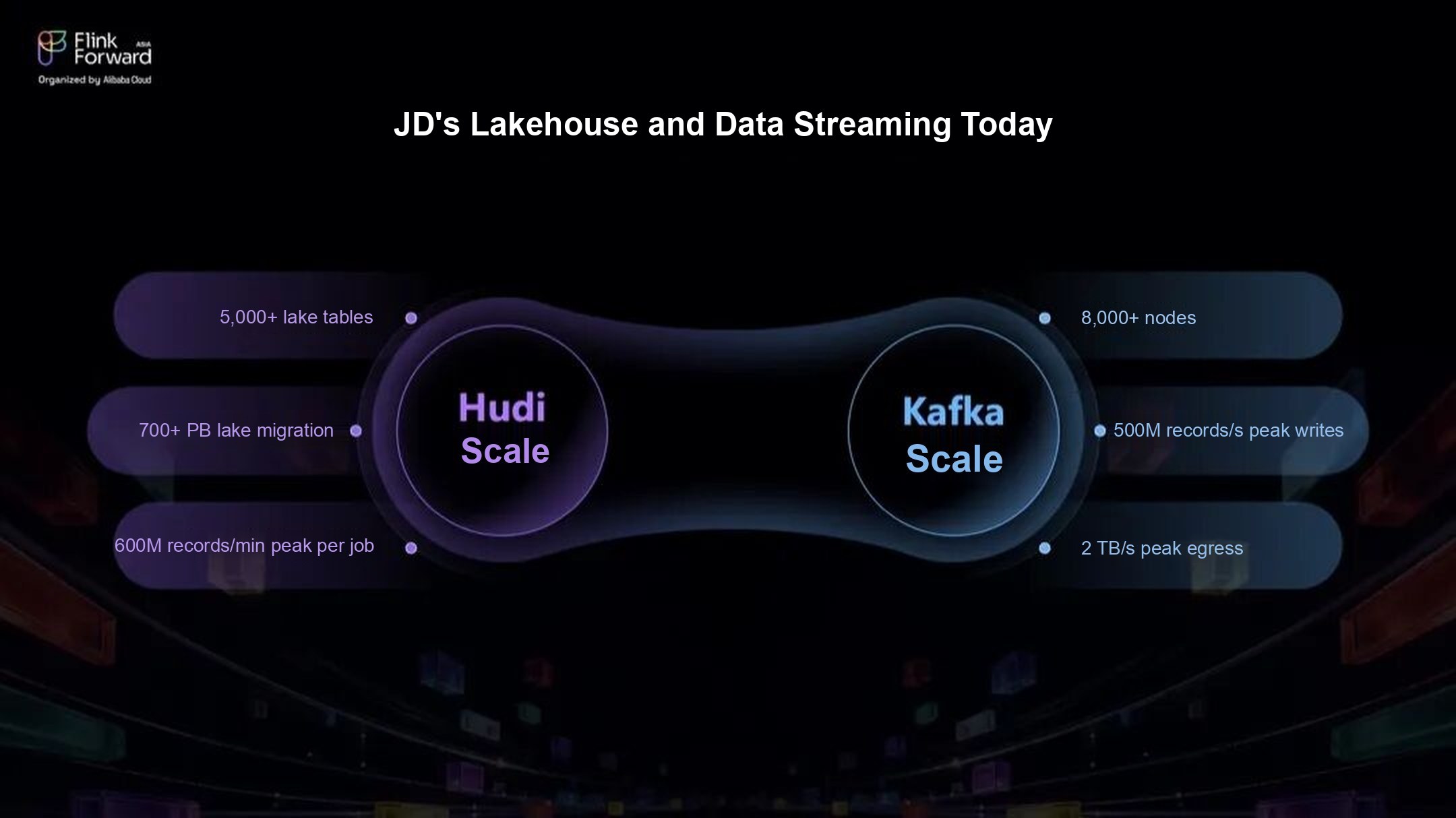 Figure 1: Scale of JD's lakehouse and streaming platforms
At this scale, small inefficiencies get expensive. An extra copy of the data, a few fields read but never used, or one more pipeline to maintain each turns directly into cost, stability risk, and engineering time.
Row-Based Consumption Wastes Bandwidth and Compute
The first problem is that message queues store data by row. Our impression log topic is a good example: reading all of it means consuming about 195 GB/min, but downstream jobs actually need only 6 GB/min. Most jobs use a handful of fields, yet a row-oriented queue makes every consumer pull the full message and then parse, filter, and drop fields in its own compute job.
That wastes resources in three places:
- Network: every consumer pulls the full message to use a few fields.
- Compute: deserializing and parsing unused fields burns CPU and memory.
- Pipeline load: the bigger the topic and the more consumers it has, the more this repeated reading and parsing adds up.
Teams use only a small fraction of the data, but the platform pays for all of it.
Separate Lakehouse and Stream Pipelines Duplicate Work
The second problem is architectural: the lakehouse and the stream are separate systems. Take training data for search and recommendation models as an example. Teams have traditionally run two pipelines side by side. The real-time pipeline quickly turns user activity into fresh training samples and features. The batch pipeline handles backfills, corrections, model training, and analysis. Running both meets different freshness needs, but it creates three problems:
- Duplicate storage. Much of the same data is stored more than once, in the message queue and in lakehouse tables.
- Duplicate compute. Both pipelines clean the data, join it, assemble features, and generate samples. Only the execution model differs.
- Inconsistent metric definitions. The two pipelines evolve separately, so field definitions, filters, error handling, and backfill logic drift apart. When a metric moves, teams often have to work out how the real-time and batch numbers are defined before they can investigate.
Why We Adopted Fluss
So we set out to connect streaming data and lakehouse data in one architecture, covering writes, storage, consumption, and lakehouse ingestion. That is why we adopted Fluss.
The goal is to gradually bring real-time streams and the lakehouse onto the same data model, the same service interfaces, and the same way of consuming data. One copy of data serves real-time jobs through Fluss streaming and batch reads, and is also written to Hudi tables for long-term analysis, model training, and historical replay with engines such as Apache Spark. Jobs that need both use union reads, which query the Hudi table and the newest Fluss data as one table.
For the platform team, this reduces duplicate pipelines and wasted resources, and puts table metadata, schemas, metric definitions, lakehouse ingestion, and operations under one set of controls.
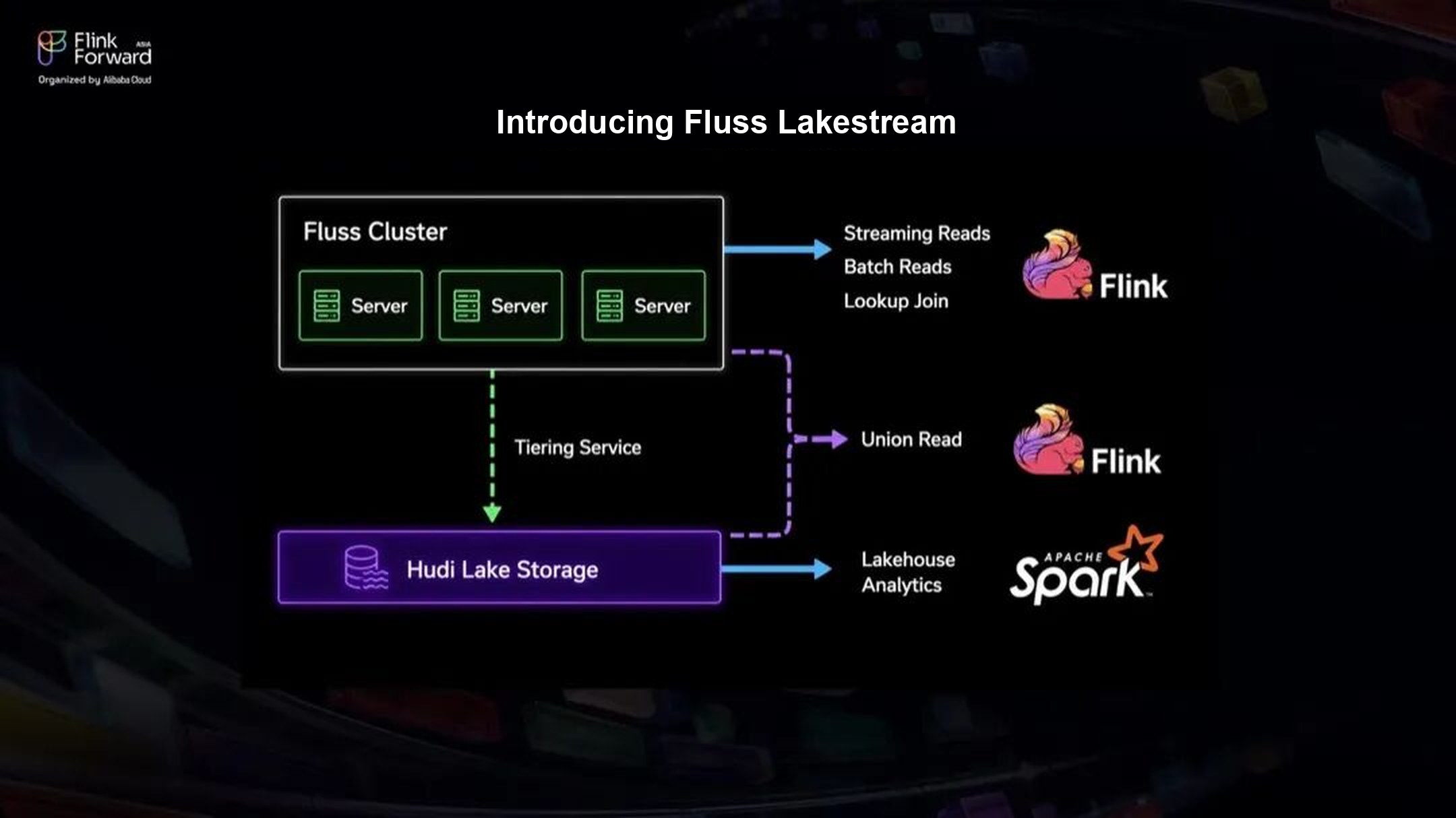 Figure 2: A Lakestream on Fluss and Hudi
Case Study: Recommendation Ranking
We chose recommendation ranking as a key production use case. Ranking is the stage of the recommendation funnel that scores each candidate item using user behavior, context, and a large number of features, so it directly drives click-through and order conversion rates. The quality, freshness, and consistency of its training samples are critical to training and iterating on the models.
Pain Points Before the Redesign
- Training samples came from scattered sources, which made them hard to build and operate. Batch and real-time samples came from different pipelines. Teams had to know two tech stacks, keep both pipelines correct and stable, and make every logic change twice. Batch and real-time metric definitions easily diverged between upstream and downstream teams.
- Samples were expensive to store and compute. The same features and labels were stored and computed several times across systems, and neither pipeline could update samples incrementally.
- Teams had to trade sample quality against freshness. The real-time pipeline had a short join window, slow row-based reads, and no shuffle, which limited sample quality. The batch pipeline was slow and hard to backfill, yet fixing real-time samples still depended on it.
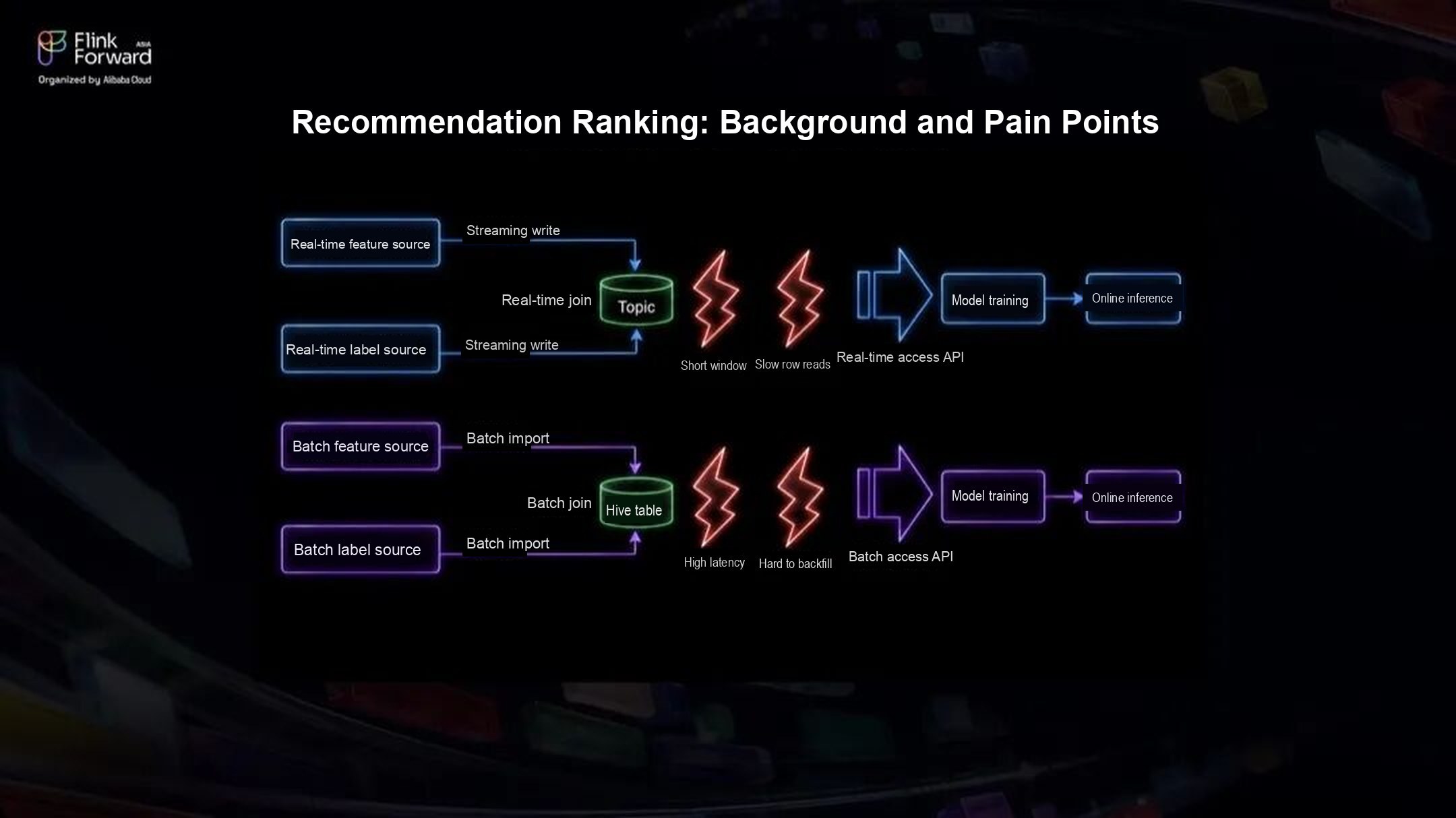 Figure 3: Recommendation ranking before the redesign
The New Architecture
The redesign gradually consolidates several parallel pipelines into one copy of data, consumed in different ways. Real-time features and labels stream into Fluss first, which supports low-latency writes and minute-level online learning. The tiering service then writes the same data into Hudi tables, where Hudi's efficient backfills support batch analysis, base model training, and catch-up training (training on recently accumulated data to bring a model up to date).
Real-time samples now come from Fluss and batch training data from Hudi, and their sources and metric definitions are converging. Field definitions, write paths, and data lifecycle are all managed through Fluss. Engineers no longer have to check whether a field exists in both pipelines and means the same thing in each, and they can spend that time on model quality and product strategy.
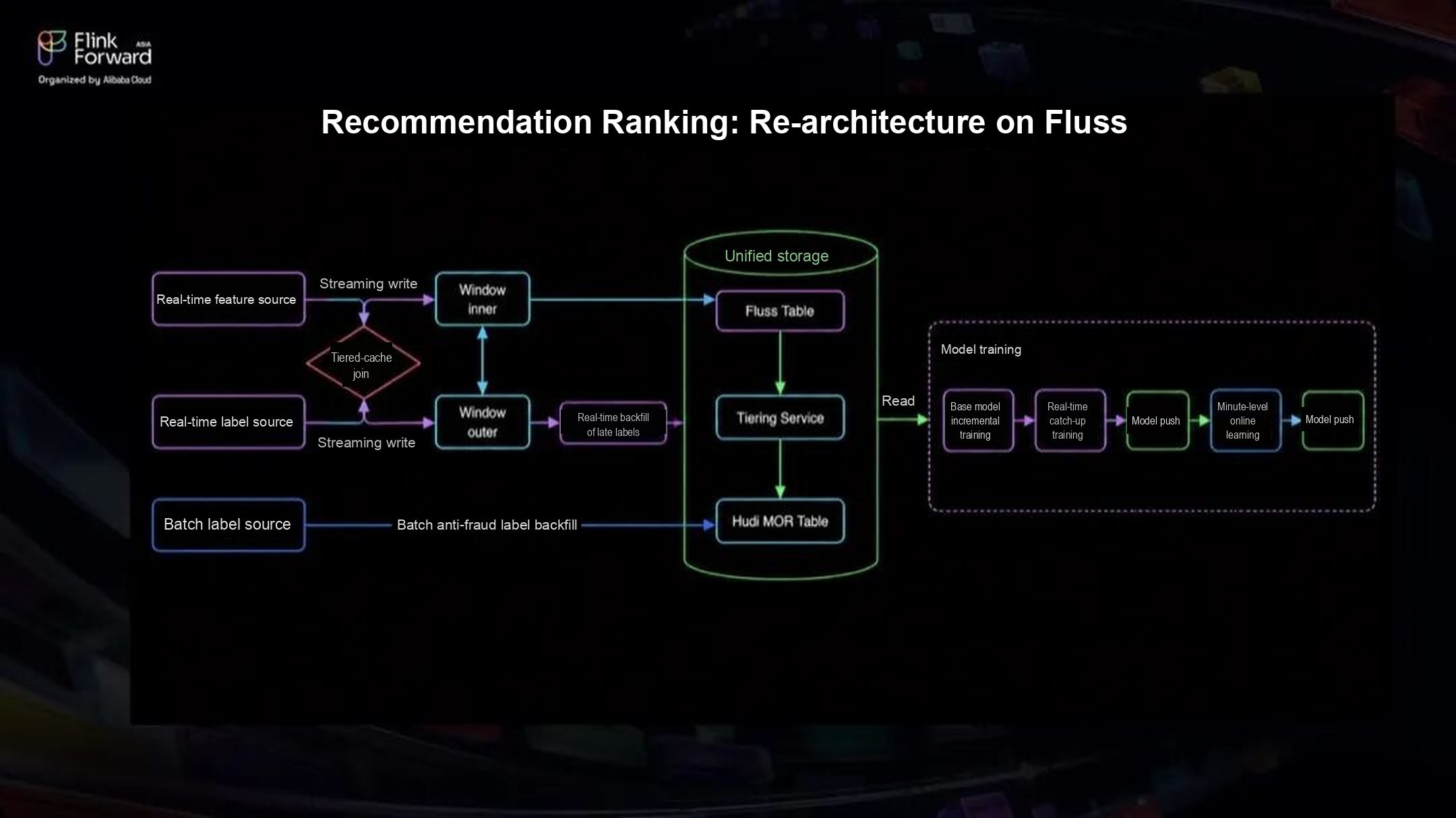 Figure 4: Recommendation ranking on Fluss and Hudi
Results
- Cost: batch compute cost down more than 80%, storage cost down more than 50%.
- Freshness: end-to-end training-data pipeline freshness improved by more than 30%.
- Engineering effort: three training-data sources (batch, catch-up, and real-time) merged into one, and two APIs (batch and real-time) merged into one.
- Business metrics: core recommendation metrics, including user click-through rate (UCTR) and order conversion rate (UCVR), improved in A/B tests.
The deployment showed that a Lakestream works for this use case. A simpler training-data pipeline, shared metric definitions, and fresher data also shorten the cycle for running and validating model experiments.
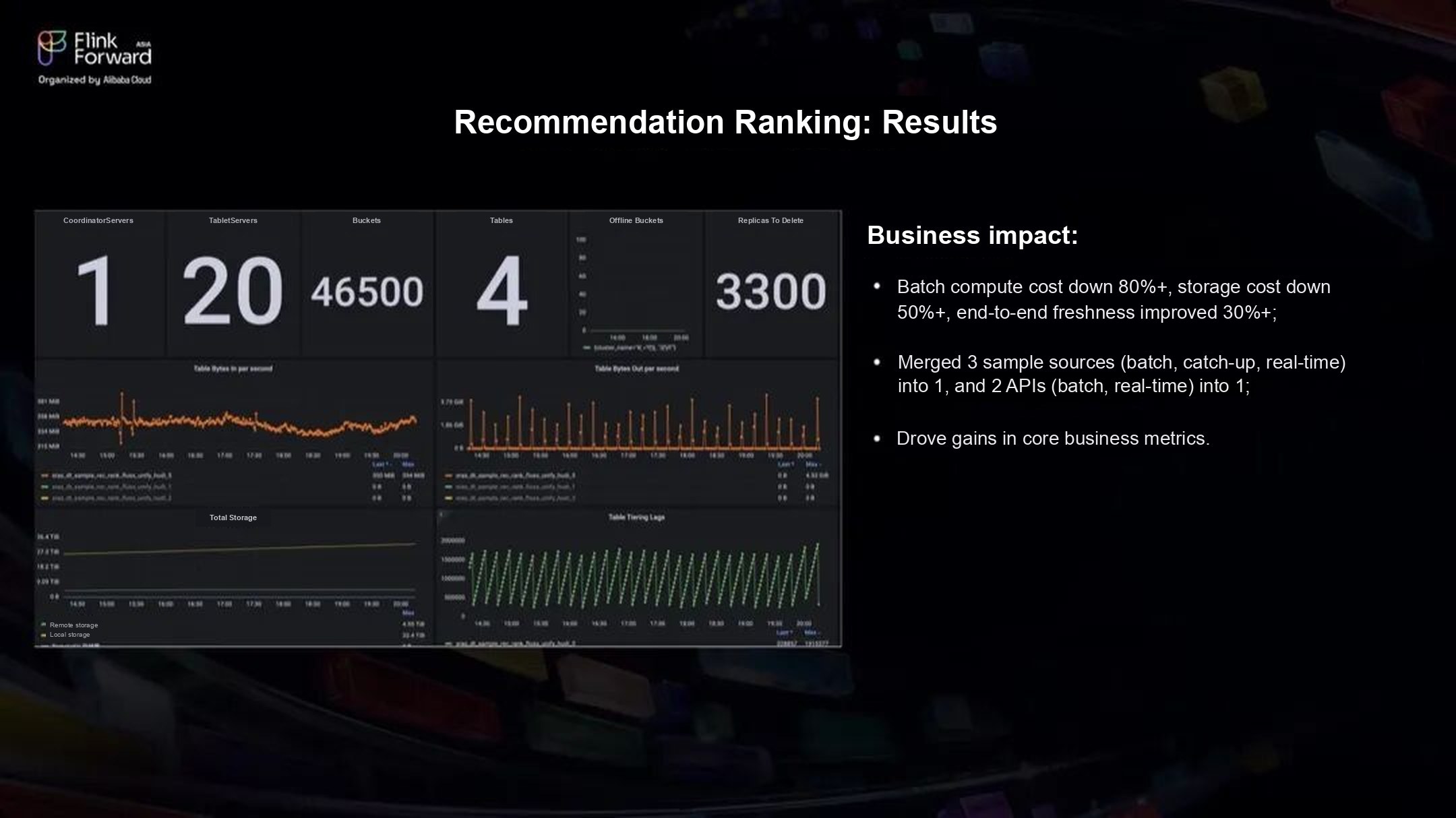 Figure 5: Recommendation ranking results
What We Built on Fluss
Tiering Fluss Data into Hudi
Fluss already tiers data into Apache Paimon, Apache Iceberg, and Lance. Our lakehouse runs on Hudi, so we extended Fluss to support it. We built a Hudi plugin for the Fluss tiering service, adapting the three stages of the tiering job: the source enumerator, the source reader, and the committer.
The tiering service has three layers:
- Runtime: TieringSourceEnumerator splits each round of tiering work and assigns the splits. TieringSourceReader reads data from Fluss and writes it to the lake table. TieringCommitter commits the lake table and reports the snapshot back to Fluss.
- Lake abstraction: a common lake storage interface hides the differences between lake formats.
- Hudi plugin: Hudi plugs in as a LakeStorage implementation. HudiLakeStorage is the entry point, and HudiLakeTieringFactory creates the HudiLakeWriter and HudiLakeCommitter.
HudiLakeWriter converts Fluss records to Hudi records and writes them in batches. HudiLakeCommitter handles the commit on the Hudi side. The tiering job then reports the lake snapshot and the matching Fluss offsets back to Fluss, so Fluss always knows how far the Hudi table has caught up.
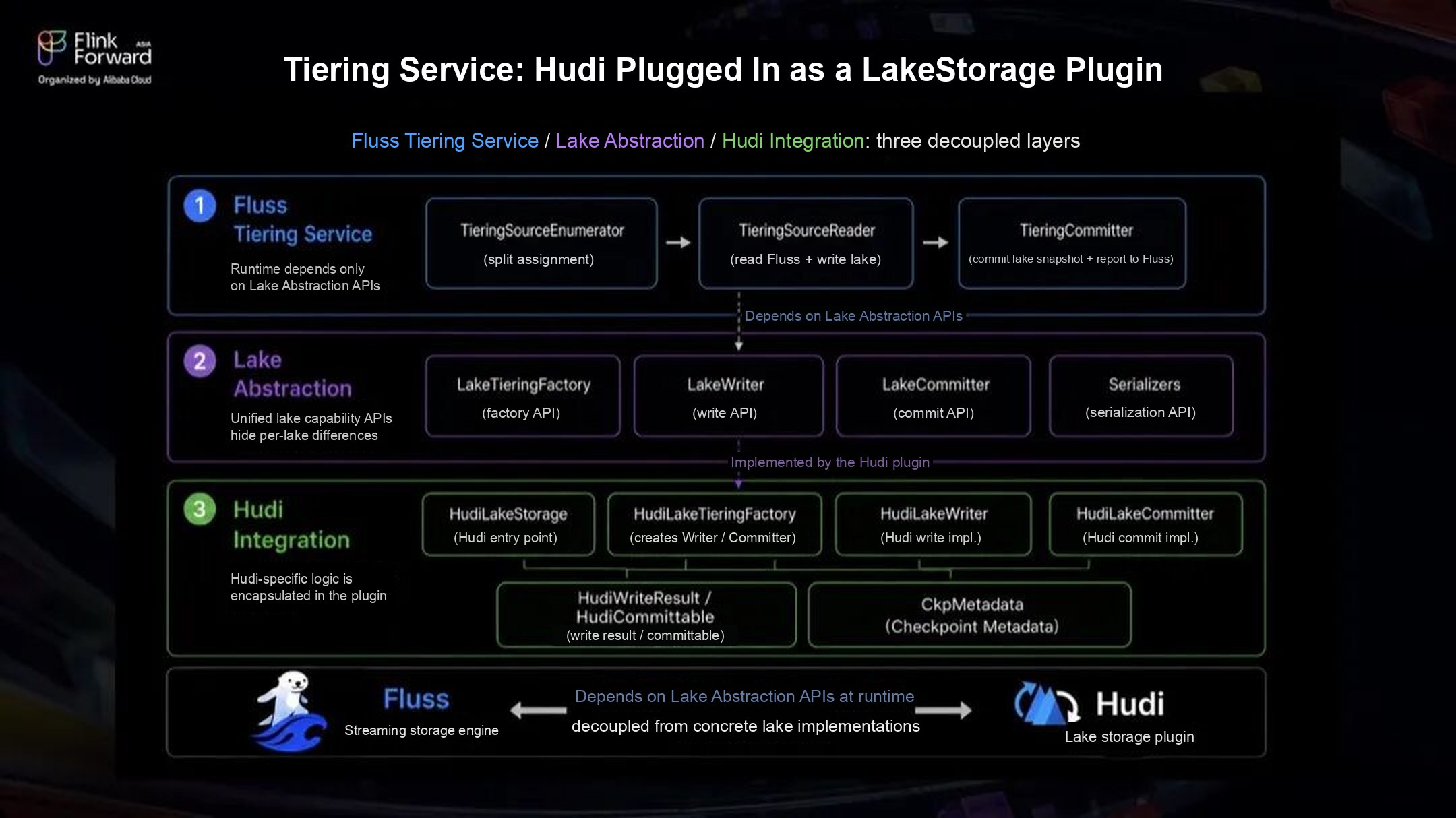 Figure 6: Architecture of Hudi tiering in Fluss
Split assignment: attach round metadata to every split. TieringSourceEnumerator divides the read work into splits and assigns them. It attaches three pieces of round metadata to each split: the number of splits in the round, the split's index, and the round's timestamp. The metadata travels with each split to a TieringSourceReader and is used later in the write and commit stages.
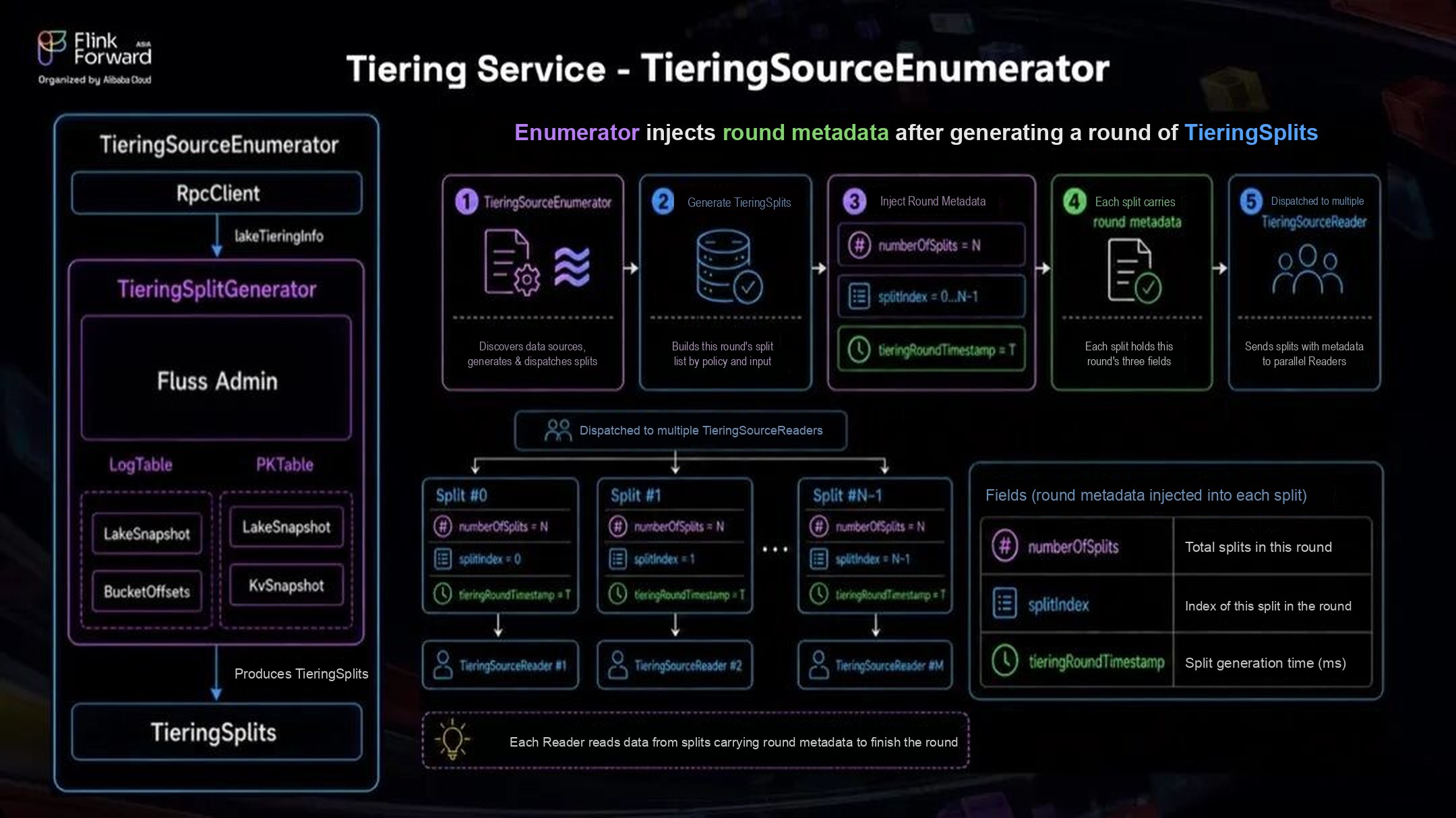 Figure 7: Hudi TieringSourceEnumerator
Instant coordination: one Hudi instant per round. When a TieringSourceReader receives a split, it passes the round metadata to HudiLakeWriter. Several splits write in parallel but must be part of the same Hudi commit, so we added round-level coordination of the Hudi instant.
Each writer reads its splitIndex from the metadata. The writer for split 0 acts as the coordinator for the round: it creates the Hudi instant, marks it INFLIGHT, and records it as the pending instant in the checkpoint metadata (CkpMetadata in the figures). The other writers read that pending instant from the checkpoint metadata and reuse it instead of creating their own. They look it up by the round's timestamp, so they never pick up the previous round's instant, and every writer in the round writes to the same INFLIGHT instant.
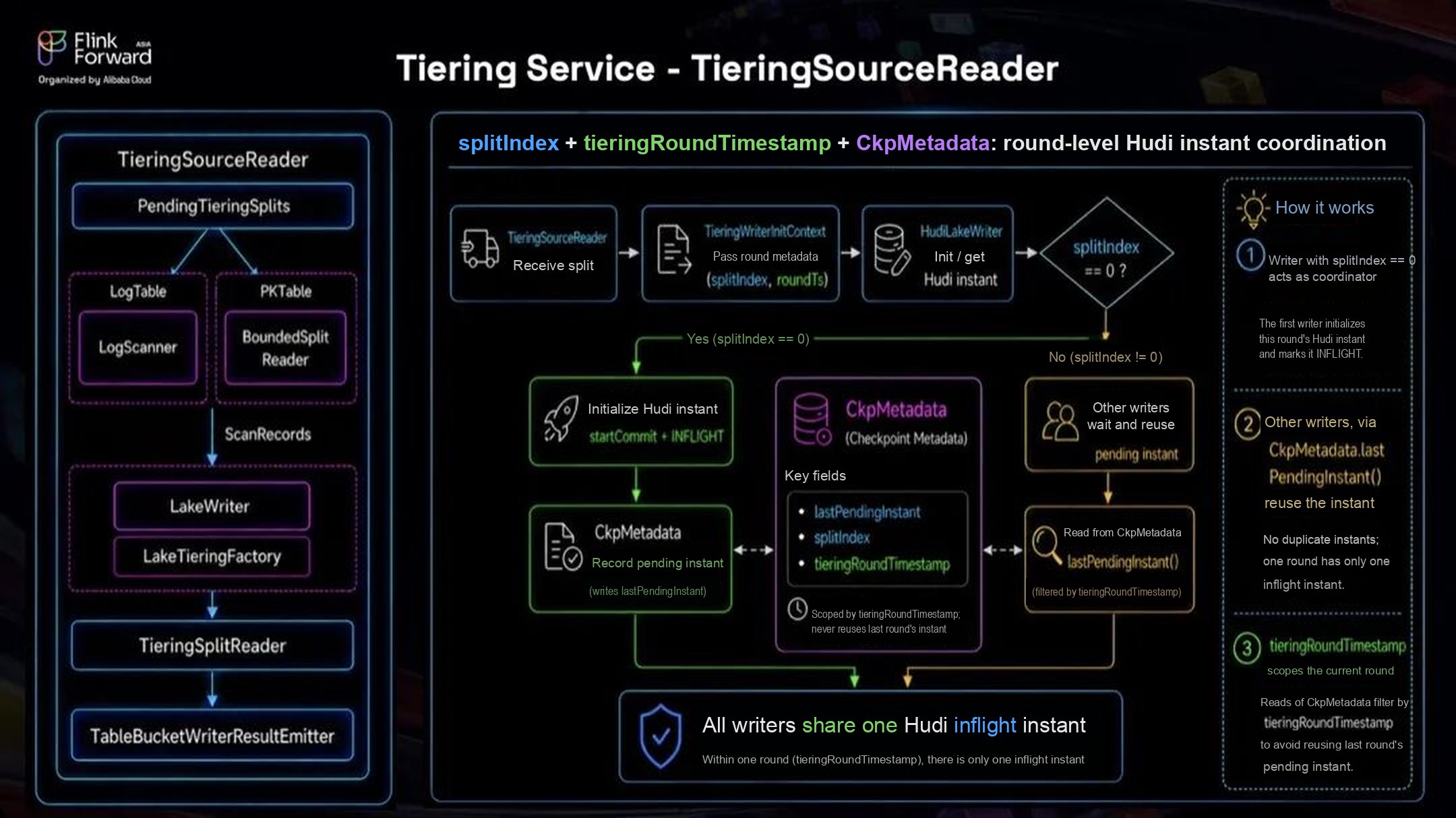 Figure 8: Hudi TieringSourceReader
Writing: format conversion, buffering, and parallel writes. HudiLakeWriter is the entry point of the Hudi write path. It writes data but does not do the final commit. Once split 0 has created the instant, each writer runs the same steps in order:
- Wrap the Fluss record and convert its schema and fields to Hudi.
- In RecordWriter, map each Fluss bucket to a Hudi bucket and map the fields.
- Buffer records in RecordWriteBuffer to write them in batches.
- Call the Hudi write client and collect the write result.
Thanks to the round-level coordination, many writers can write into the same Hudi instant in parallel.
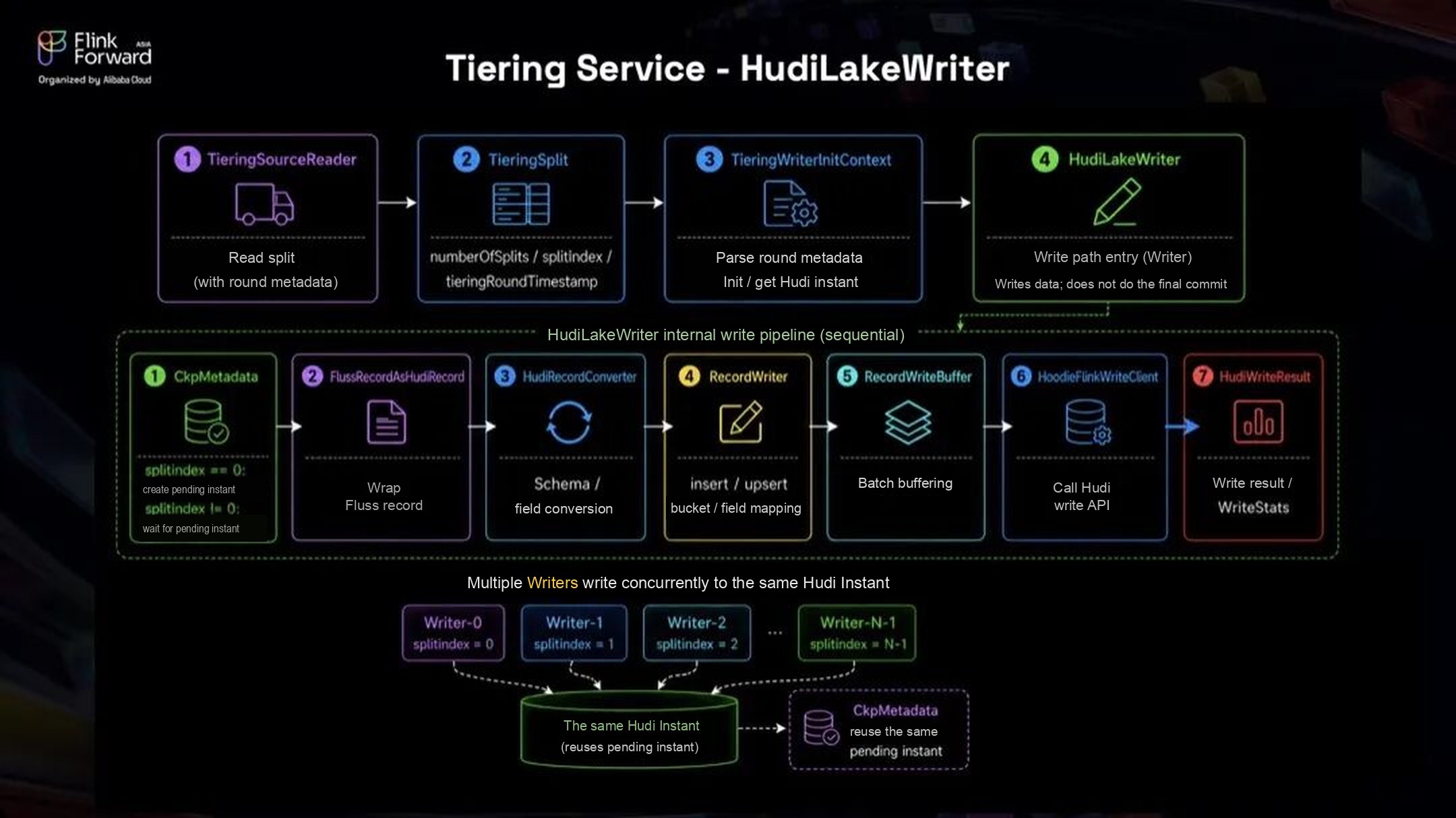 Figure 9: HudiLakeWriter
Commit: aggregate the results and report the lake snapshot. TieringCommitter collects the results from all writers and checks that they belong to the same round and the same Hudi instant. It then prepares the Fluss bucket offsets file. Once the Hudi instant is completed on the timeline and the checkpoint metadata is marked COMPLETED, it sends the snapshot, including offsets and manifests, to the Fluss Coordinator, the server that manages cluster metadata.
The Hudi commit also stores the Fluss snapshot metadata in its commit metadata. The Hudi instant time serves as the Fluss lake snapshot ID and is reported to Fluss together with the bucket offsets. One Hudi commit per round makes all of the round's writes visible atomically. The reported lake snapshot is what Fluss uses to track tiering progress, recover from failures, and keep the lakehouse and the stream consistent.
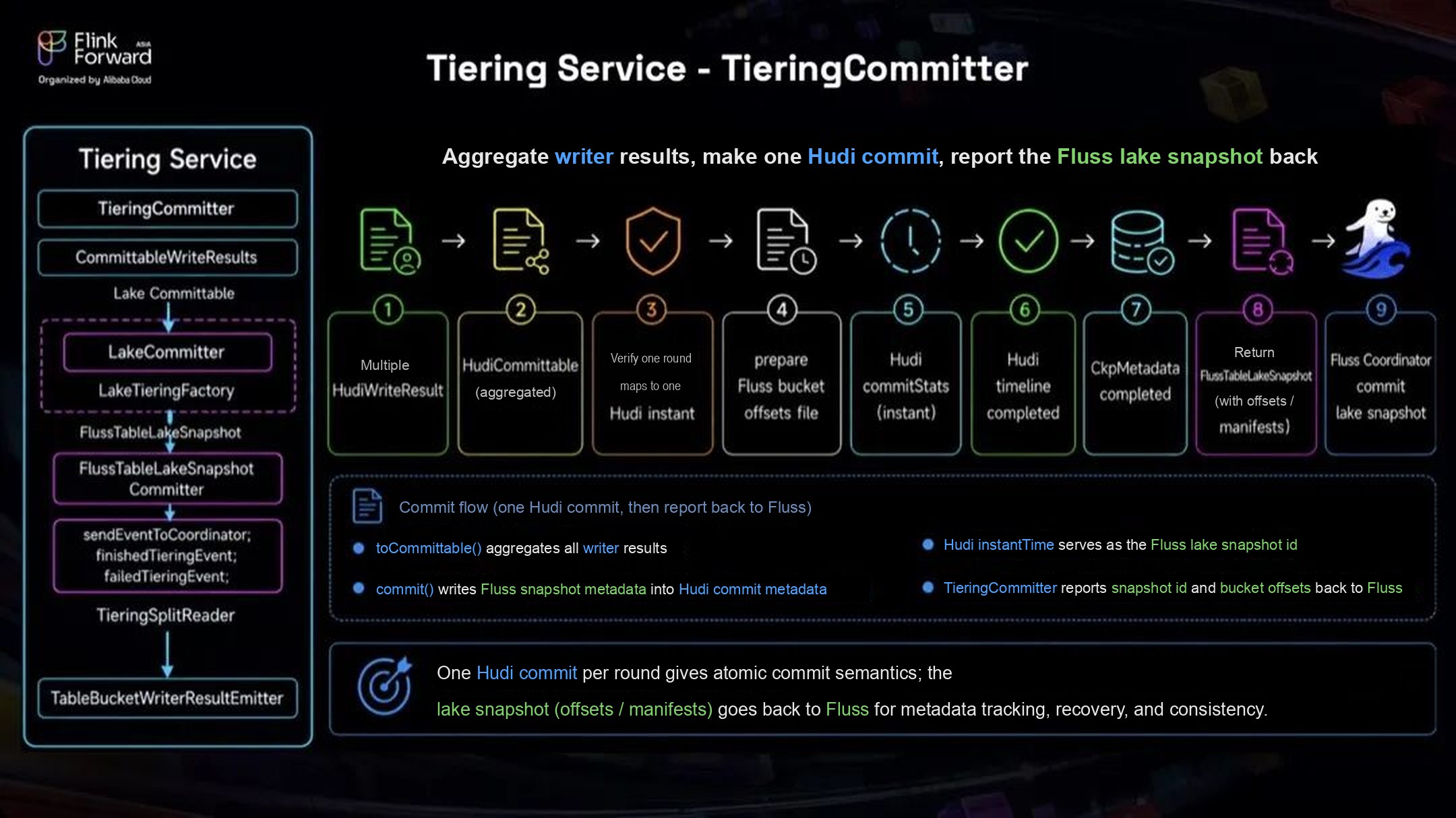 Figure 10: Hudi TieringCommitter
Server-Side Consumer Offsets
Tracking consumer offsets is a basic feature of any messaging system. The Fluss version we started from did not store consumer offsets on the server. Flink jobs kept offsets in their checkpoints, so a job restarted without its state lost its place. Clients outside Flink, in Java, Python, or Rust, also needed somewhere to store offsets. We therefore added consumer offset management to the Fluss server.
The offsets live in a primary key system table, consumer_offsets, keyed by group, table_id, partition_id, and bucket_num. An offset record holds the offset, leader epoch, metadata, and commit timestamp. A group metadata record holds the protocol, generation, group leader, members, and so on.
The table holds two kinds of records, told apart by the partition and bucket fields:
- Consumer offsets: when the bucket is not -1, the record stores the offset for that bucket. This works for both partitioned and non-partitioned tables.
- Consumer group metadata: when both partition and bucket are -1, the record stores the group's protocol, leader, members, and other state at a point in time.
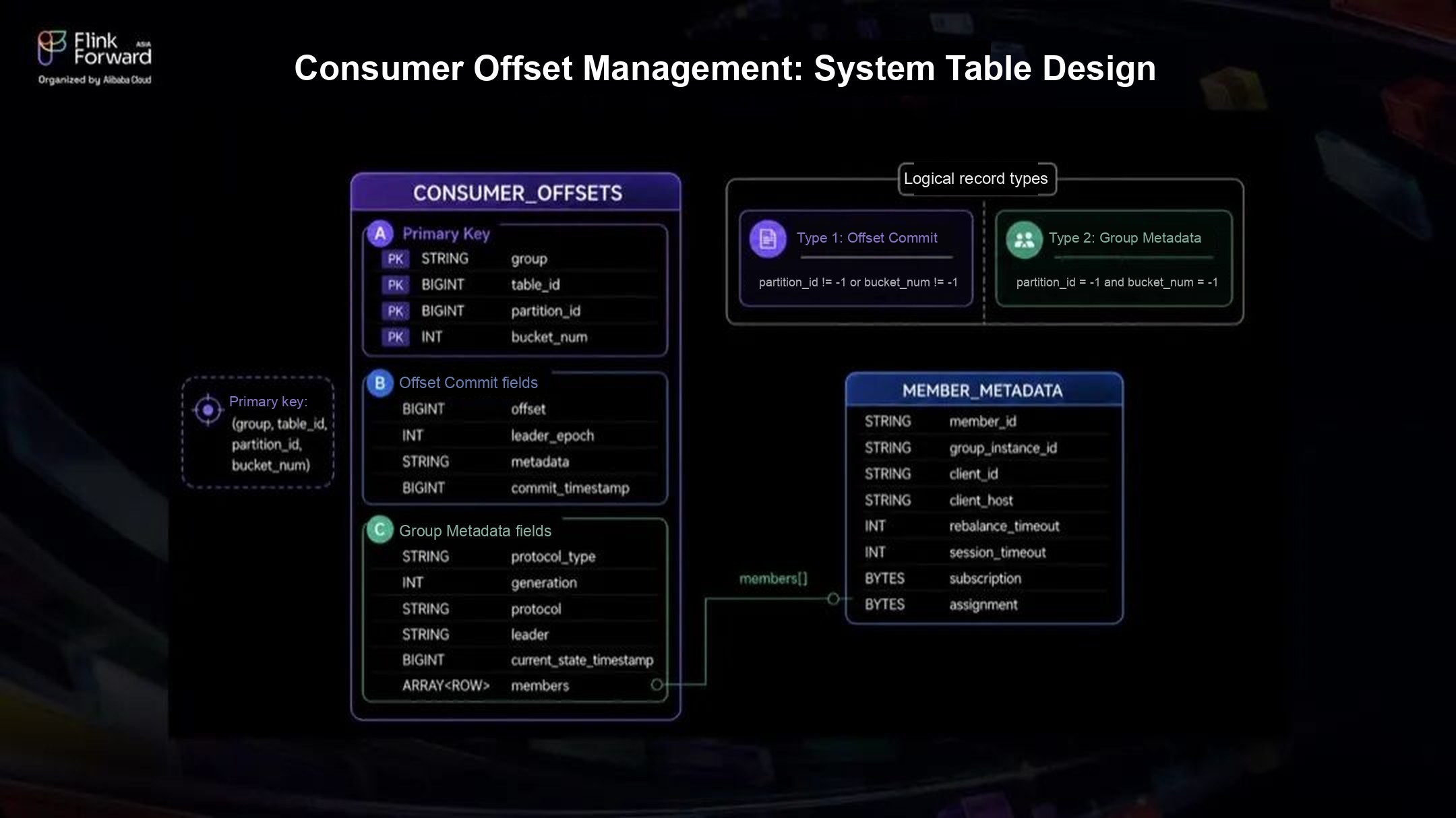 Figure 11: The consumer offset system table
On top of the system table we added client-server RPCs to join a group, leave a group, commit offsets, and describe offsets.
JoinGroup: join a group and get buckets assigned. A consumer locates its group coordinator by hashing the groupId against the bucket count of the consumer_offsets table, then talks to the Fluss server that hosts it. For Consumer1 in the figure:
Consumer1 sends a JoinGroup request to the group coordinator. The coordinator starts a rebalance by telling existing members in their heartbeat responses, then hands the member list to the group leader. The group leader assigns buckets and submits the assignment in a SyncGroup request, and the coordinator returns each member's buckets in its SyncGroup response.
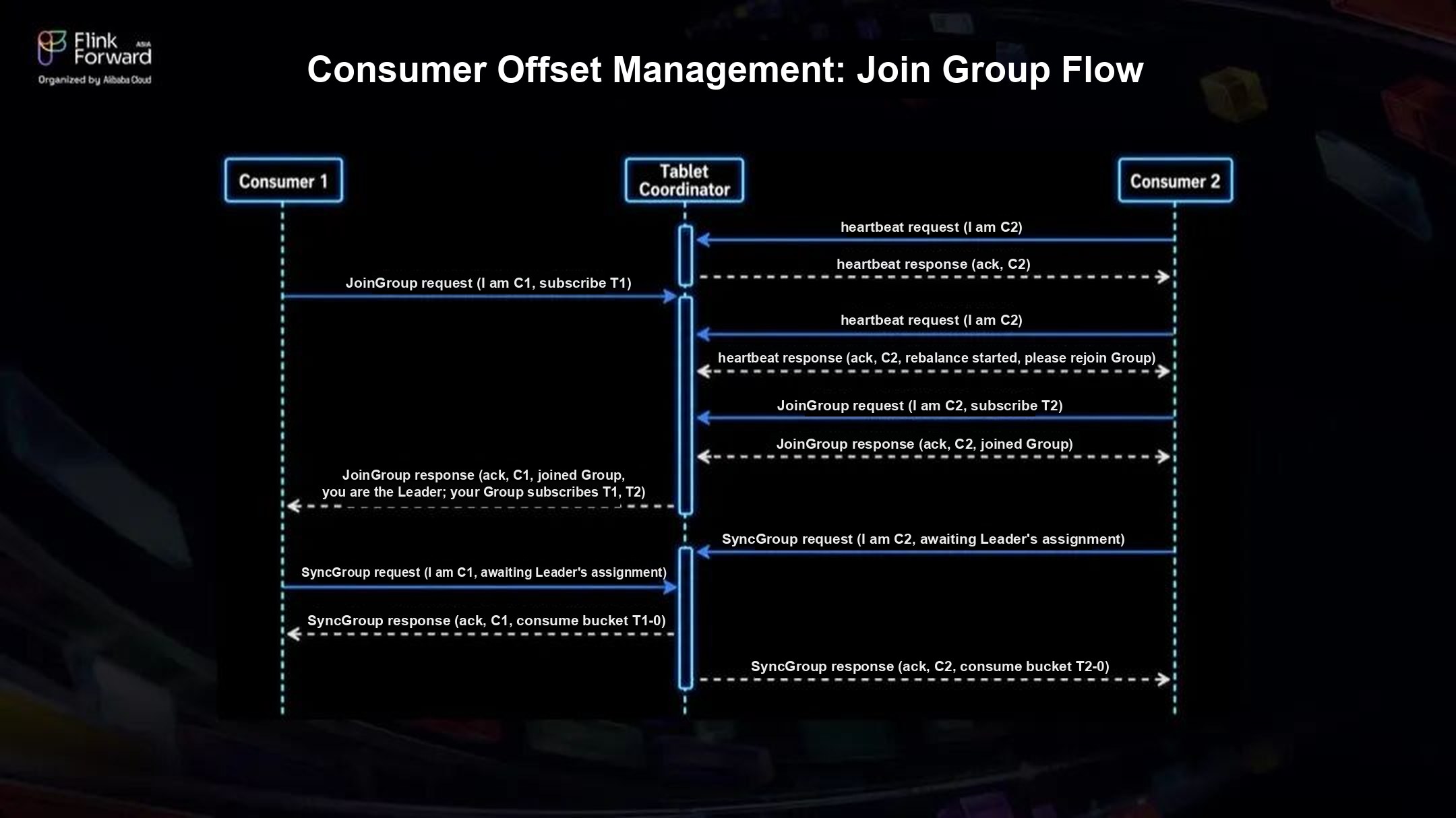 Figure 12: JoinGroup flow
LeaveGroup: reassign buckets after a member leaves. Consumer2 sends a LeaveGroup request. The Fluss server removes it and starts a rebalance for the remaining members, which then follow the JoinGroup flow: they rejoin, the group leader assigns buckets, and each member gets its assignment.
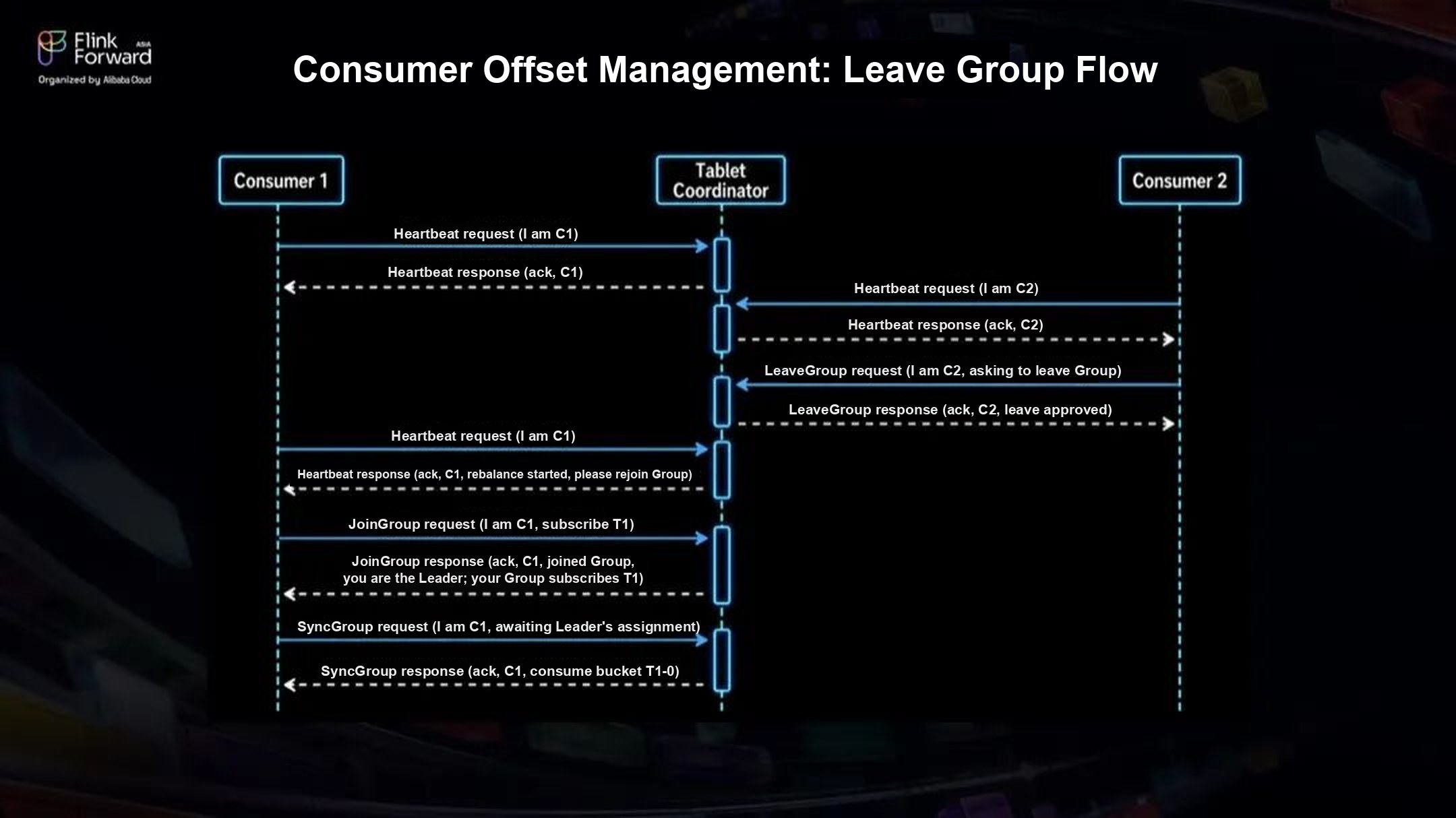 Figure 13: LeaveGroup flow
CommitOffset: save progress. The consumer sends its partition, bucket, and offset to the Fluss server in a CommitOffset request, and the server writes them to the consumer_offsets table. Offset commits are sent independently of heartbeats, JoinGroup, and other requests.
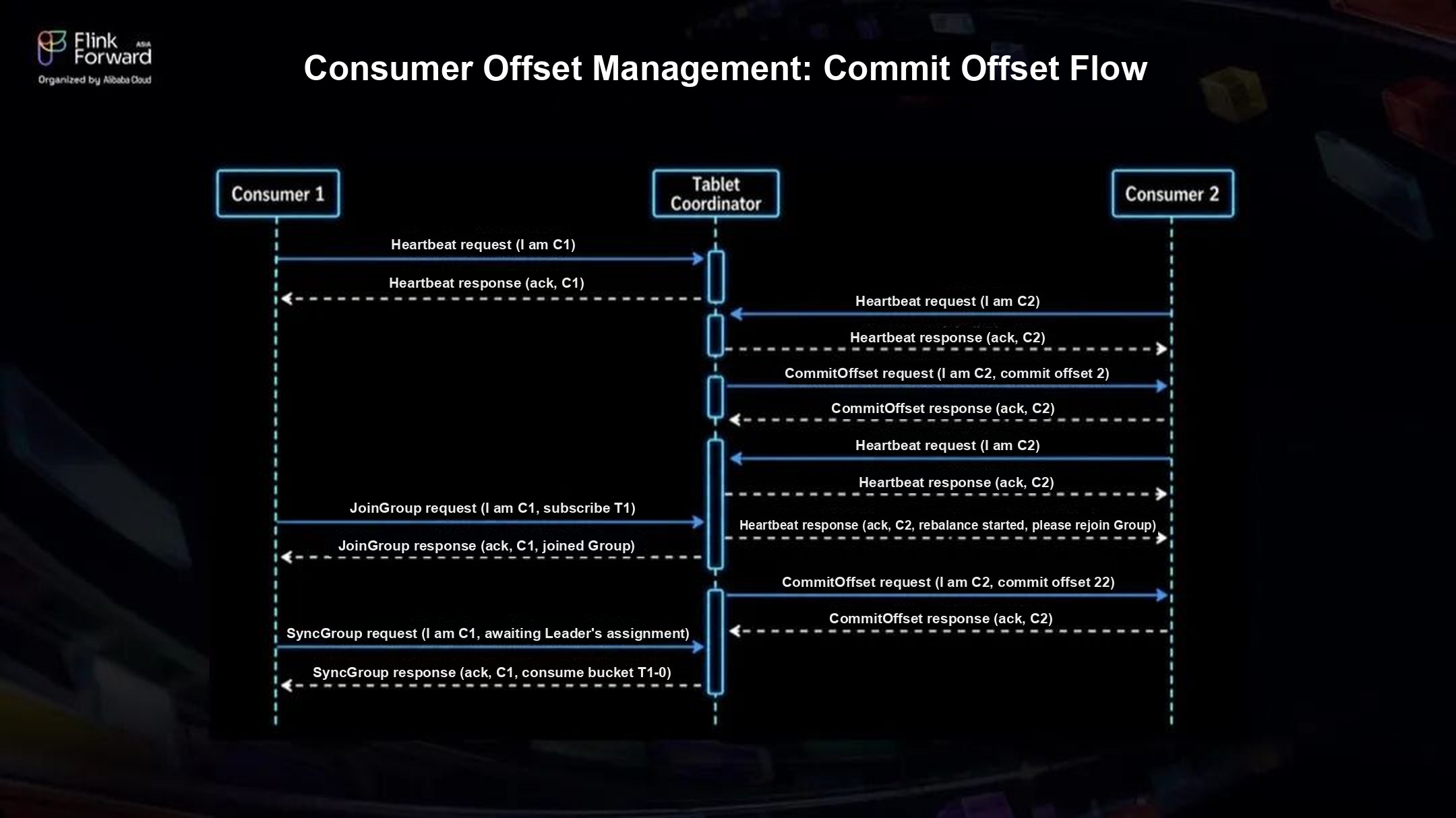 Figure 14: CommitOffset flow
DescribeOffset: check progress and lag. Describing a group returns, for each bucket it consumes, the current offset, the log end offset, the lag, and client metadata. This makes it easy to spot lagging consumer groups and the clients behind them.
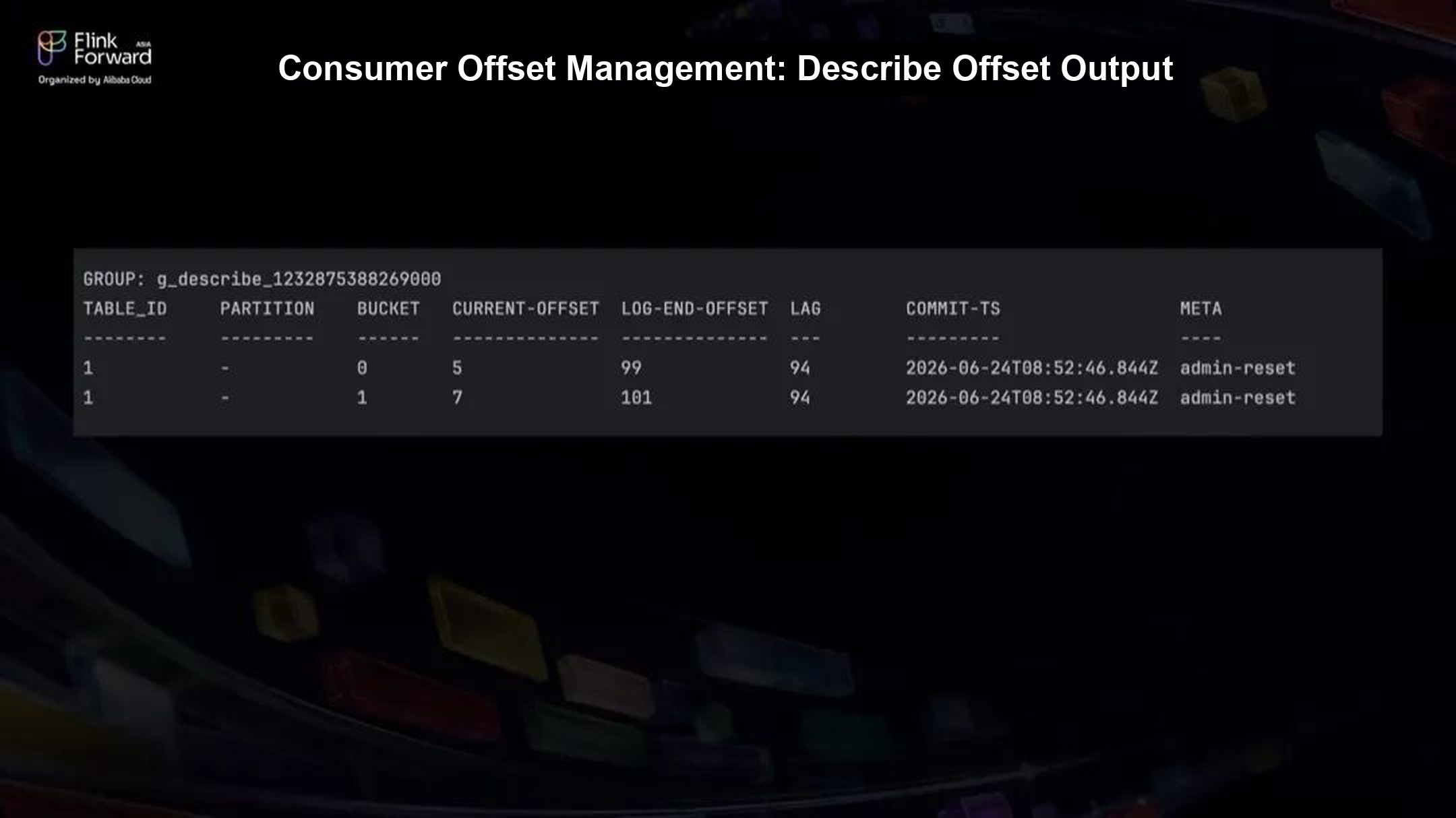 Figure 15: Consumer offsets and lag for a group
Coordinator High Availability
We started from Fluss 0.8, which did not yet support high availability for the Coordinator, so it was a single point of failure. The tiering service reports its progress to the Coordinator, so tiering also depends on the Coordinator staying up. We built our own high availability setup first.
It runs on JD's internal Kubernetes platform, with a Controller daemon deployed as a StatefulSet. In each pod, the Controller runs as PID 1 and registers with ZooKeeper on startup. The pod that registers successfully becomes active and starts the Fluss Coordinator process. The other pods are cold standbys that watch the ephemeral znode and take over if it disappears.
Supervision happens at two levels: the StatefulSet keeps the pods running and restarts them, and the Controller manages the Fluss Coordinator process inside each pod. Together they keep the Coordinator available.
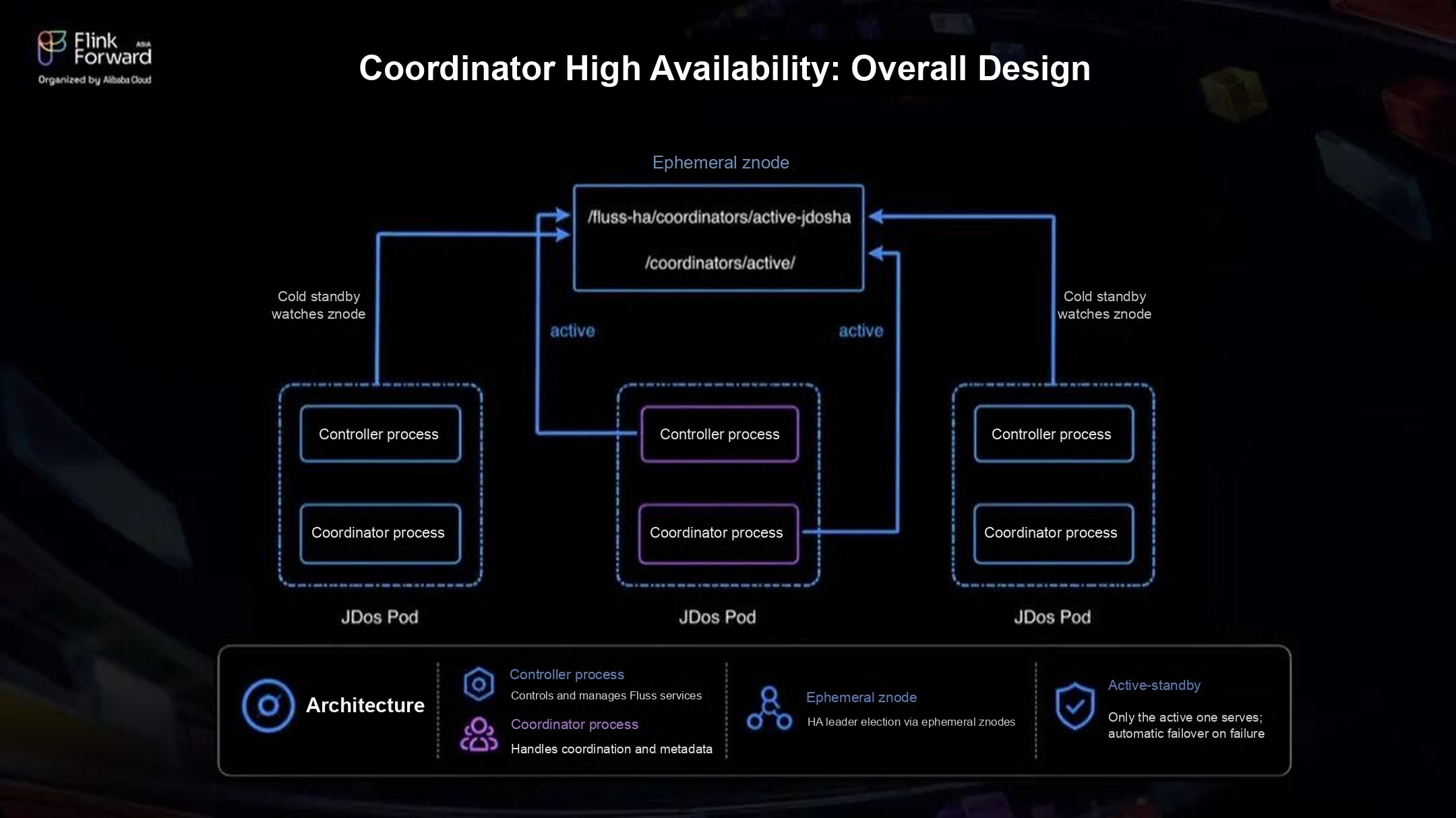 Figure 16: Coordinator high availability design
Other Features
We also built smaller features, such as dynamic configuration, which changes key parameters at runtime without restarts, and rebalance throttling, which limits how fast bucket replicas move between servers during cluster rebalancing to reduce the impact on the cluster.
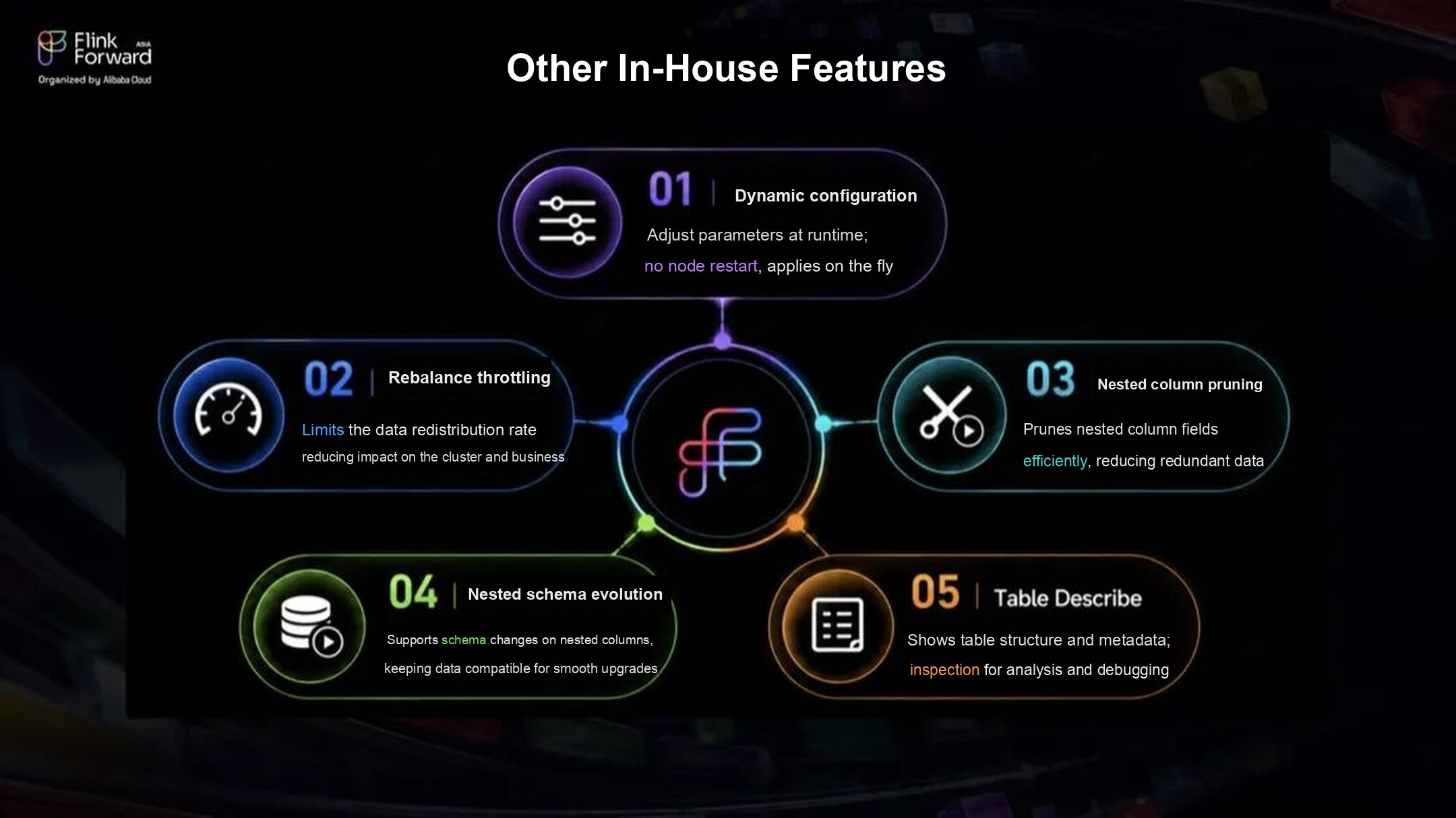 Figure 17: Other features we built on Fluss
What's Next
We are contributing Hudi tiering back to the Fluss community as FIP-24: Tiering Service to Hudi, along with what we learned about Hudi integration, writes, commits, type conversion, and running it in production. We hope it helps other teams that run Hudi adopt a Lakestream, not only JD.
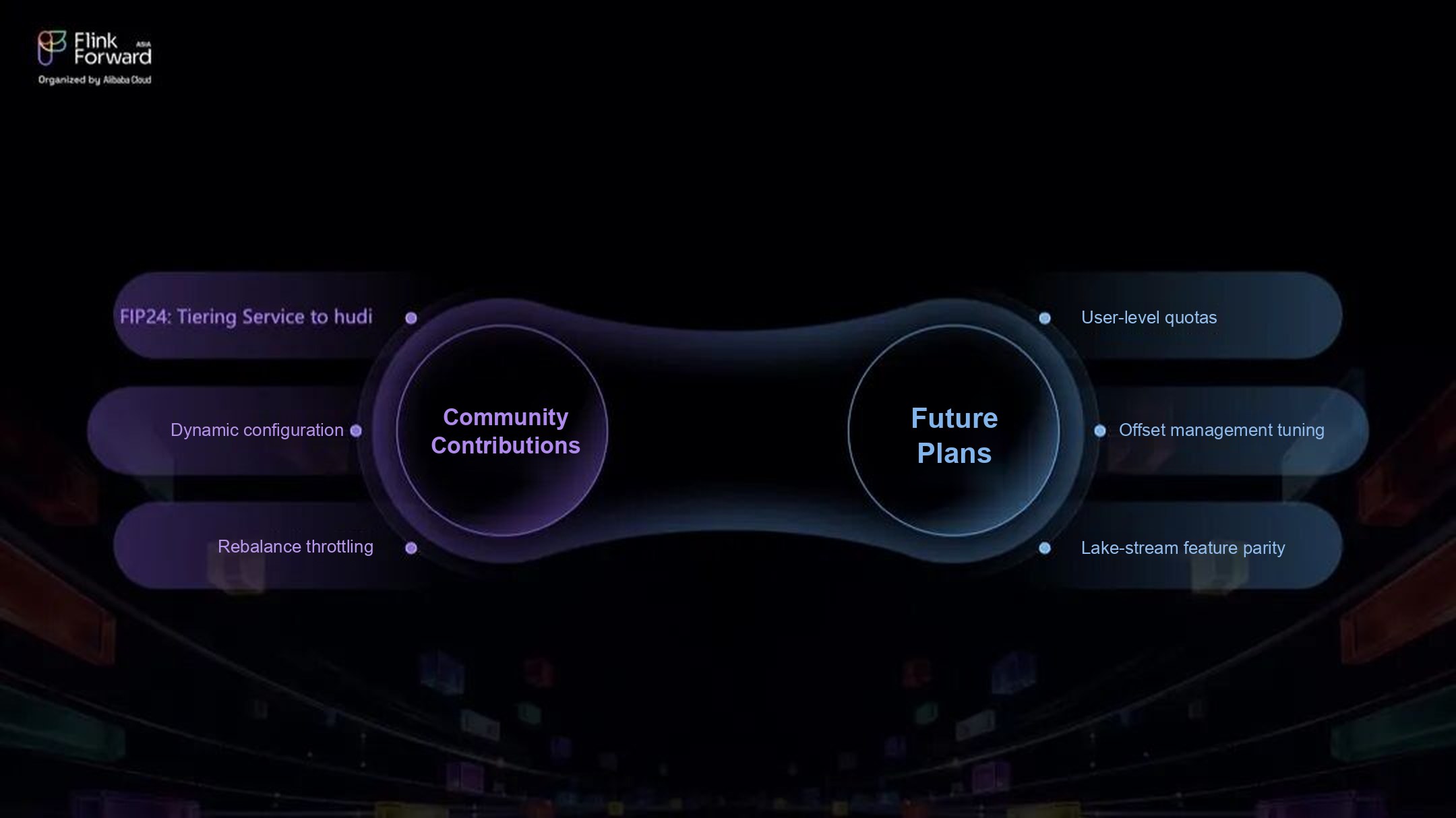 Figure 18: Community contributions and future plans
Our next steps:
- User-level quotas. Add per-user quotas to control resource use by tenant and by team more precisely, so a traffic spike in one place does not cause jitter across the cluster.
- Offset management tuning. Reduce consumer group rebalance time for groups that consume many buckets.
- Feature parity with JD's Hudi stack. Keep closing the gaps with what JD's Hudi stack already supports, such as schema evolution and dynamic bucketing. The goal is for teams to use lakehouse and stream data through one table, one access method, and one set of governance controls.