SQL Queries
Hudi stores and organizes data on storage while providing different ways of querying, across a wide range of query engines. This page will show how to issue different queries and discuss any specific instructions for each query engine.
Spark SQL
The Spark quickstart provides a good overview of how to use Spark SQL to query Hudi tables. This section will go into more advanced configurations and functionalities.
Snapshot Query
Snapshot queries are the most common query type for Hudi tables. Spark SQL supports snapshot queries on both COPY_ON_WRITE and MERGE_ON_READ tables. Using session properties, you can specify options around indexing to optimize query performance, as shown below.
-- You can turn on relevant options for indexing.

-- Turn on use of column stat index, to perform range queries.
SET hoodie.metadata.column.stats.enable=true;
SELECT * FROM hudi_table
WHERE price > 1.0 and price < 10.0

-- Turn on use of record level index, to perform point queries.
SET hoodie.metadata.record.index.enable=true;
SELECT * FROM hudi_table
WHERE uuid = 'c8abbe79-8d89-47ea-b4ce-4d224bae5bfa'
Users are encouraged to migrate to Hudi versions > 0.12.x, for the best spark experience and discouraged from using any older approaches using path filters. We expect that native integration with Spark's optimized table readers along with Hudi's automatic table management will yield great performance benefits in those versions.
Snapshot Query with Index Acceleration
In this section we would go over the various indexes and how they help in data skipping in Hudi. We will first create a hudi table without any index.
-- Create a table with primary key
CREATE TABLE hudi_indexed_table (
    ts BIGINT,
    uuid STRING,
    rider STRING,
    driver STRING,
    fare DOUBLE,
    city STRING
) USING HUDI
options(
    primaryKey ='uuid',
    hoodie.write.record.merge.mode = "COMMIT_TIME_ORDERING"
)
PARTITIONED BY (city);

INSERT INTO hudi_indexed_table
VALUES
(1695159649,'334e26e9-8355-45cc-97c6-c31daf0df330','rider-A','driver-K',19.10,'san_francisco'),
(1695091554,'e96c4396-3fad-413a-a942-4cb36106d721','rider-C','driver-M',27.70 ,'san_francisco'),
(1695046462,'9909a8b1-2d15-4d3d-8ec9-efc48c536a00','rider-D','driver-L',33.90 ,'san_francisco'),
(1695332066,'1dced545-862b-4ceb-8b43-d2a568f6616b','rider-E','driver-O',93.50,'san_francisco'),
(1695516137,'e3cf430c-889d-4015-bc98-59bdce1e530c','rider-F','driver-P',34.15,'sao_paulo'    ),
(1695376420,'7a84095f-737f-40bc-b62f-6b69664712d2','rider-G','driver-Q',43.40 ,'sao_paulo'    ),
(1695173887,'3eeb61f7-c2b0-4636-99bd-5d7a5a1d2c04','rider-I','driver-S',41.06 ,'chennai'      ),
(1695115999,'c8abbe79-8d89-47ea-b4ce-4d224bae5bfa','rider-J','driver-T',17.85,'chennai');
UPDATE hudi_indexed_table SET rider = 'rider-B', driver = 'driver-N', ts = '1697516137' WHERE rider = 'rider-A';
With the query run below, we will see no data skipping or pruning since there is no index created yet in the table as can be seen in the image below. All the files are scanned in the table to fetch the data. Let's create a secondary index on the rider column.
SHOW INDEXES FROM hudi_indexed_table;
SELECT * FROM hudi_indexed_table WHERE rider = 'rider-B';
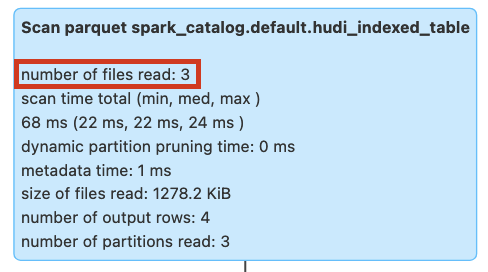
Figure: Query pruning without secondary index
Query using Secondary Index
We will run the query again after creating secondary index on rider column. The query would now show the files scanned as 1 compared to 3 files scanned without index.
Please note in order to create secondary index:
- The table must have a primary key and merge mode should be COMMIT_TIME_ORDERING.
- Record index must be enabled. This can be done by setting
hoodie.metadata.record.index.enable=trueand then creatingrecord_index. Please note the example below.
-- We will first create a record index since secondary index is dependent upon it
CREATE INDEX record_index ON hudi_indexed_table (uuid);
-- We create a secondary index on rider column
CREATE INDEX idx_rider ON hudi_indexed_table (rider);
-- We run the same query again
SELECT * FROM hudi_indexed_table WHERE rider = 'rider-B';
DROP INDEX record_index on hudi_indexed_table;
DROP INDEX secondary_index_idx_rider on hudi_indexed_table;
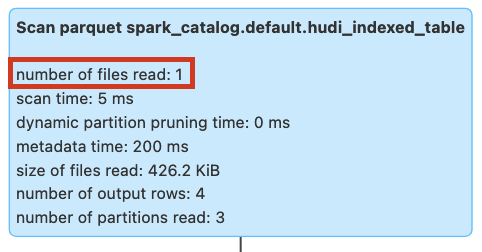
Figure: Query pruning with secondary index
Query using Bloom Filter Expression Index
With the query run below, we will see no data skipping or pruning since there is no index created yet on the driver column.
All the files are scanned in the table to fetch the data.
SHOW INDEXES FROM hudi_indexed_table;
SELECT * FROM hudi_indexed_table WHERE driver = 'driver-N';
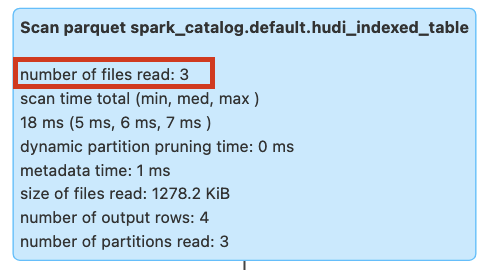
Figure: Query pruning without bloom filter expression index
We will run the query again after creating bloom filter expression index on rider column. The query would now show the files scanned as 1 compared to 3 files scanned without index.
-- We create a bloom filter expression index on driver column
CREATE INDEX idx_bloom_driver ON hudi_indexed_table USING bloom_filters(driver) OPTIONS(expr='identity');
-- We run the same query again
SELECT * FROM hudi_indexed_table WHERE driver = 'driver-N';
DROP INDEX expr_index_idx_bloom_driver on hudi_indexed_table;
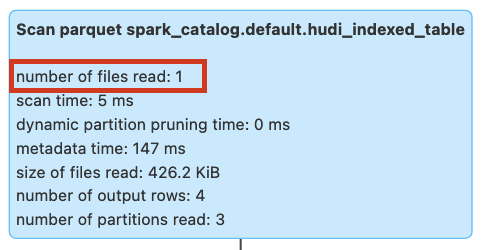
Figure: Query pruning with bloom filter expression index
Query using Column Stats Expression Index
With the query run below, we will see no data skipping or pruning since there is no index created yet in the table as can be seen in the image below. All the files are scanned in the table to fetch the data.
SHOW INDEXES FROM hudi_indexed_table;
SELECT uuid, rider FROM hudi_indexed_table WHERE from_unixtime(ts, 'yyyy-MM-dd') = '2023-10-17';
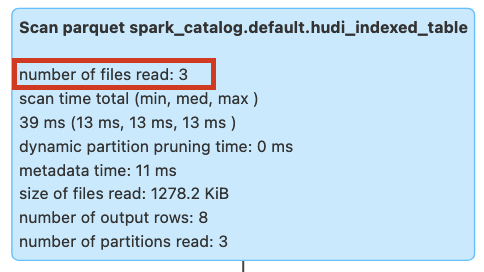
Figure: Query pruning without column stat expression index
We will run the query again after creating column stat expression index on ts column. The query would now show the files scanned as 1 compared to 3 files scanned without index.
-- We create a column stat expression index on ts column
CREATE INDEX idx_column_ts ON hudi_indexed_table USING column_stats(ts) OPTIONS(expr='from_unixtime', format = 'yyyy-MM-dd');
-- We run the same query again
SELECT uuid, rider FROM hudi_indexed_table WHERE from_unixtime(ts, 'yyyy-MM-dd') = '2023-10-17';
DROP INDEX expr_index_idx_column_ts on hudi_indexed_table;
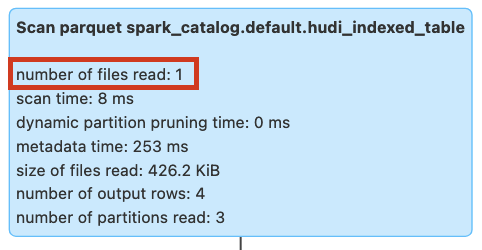
Figure: Query pruning with column stat expression index
Query using Partition Stats Index
With the query run below, we will see no data skipping or pruning since there is no partition stats index created yet in the table as can be seen in the image below. All the partitions are scanned in the table to fetch the data.
SHOW INDEXES FROM hudi_indexed_table;
SELECT * FROM hudi_indexed_table WHERE rider >= 'rider-H';
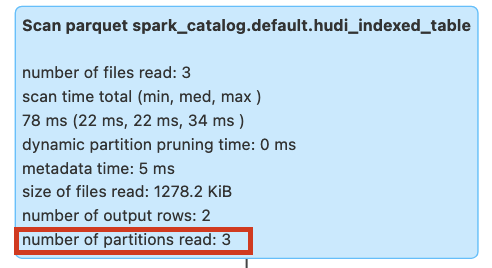
Figure: Query pruning without partition stats index
We will run the query again after creating partition stats index. The query would now show the partitions scanned as 1 compared to 3 partitions scanned without index.
-- We will need to enable column stats as well since partition stats index leverages it
SET hoodie.metadata.index.partition.stats.enable=true;
SET hoodie.metadata.index.column.stats.enable=true;
INSERT INTO hudi_indexed_table
VALUES
(1695159649,'854g46e0-8355-45cc-97c6-c31daf0df330','rider-H','driver-T',19.10,'chennai');
-- Run the query again on the table with partition stats index
SELECT * FROM hudi_indexed_table WHERE rider >= 'rider-H';
DROP INDEX column_stats on hudi_indexed_table;
DROP INDEX partition_stats on hudi_indexed_table;
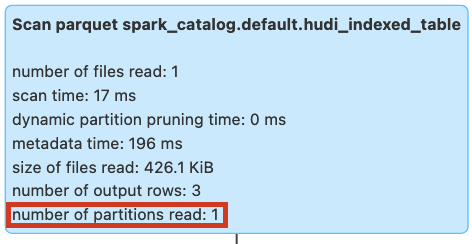
Figure: Query pruning with partition stats index
Snapshot Query with Event Time Ordering
Hudi supports different record merge modes for merging the records from the same key. Event time ordering is one of the merge modes where the records are merged based on the event time. Let's create a table with event time ordering merge mode.
CREATE TABLE IF NOT EXISTS hudi_table_merge_mode (
  id INT,
  name STRING,
  ts LONG,
  price DOUBLE
) USING hudi
TBLPROPERTIES (
  type = 'mor',
  primaryKey = 'id',
  precombineField = 'ts',
  recordMergeMode = 'EVENT_TIME_ORDERING'
)
LOCATION 'file:///tmp/hudi_table_merge_mode/';

-- insert a record
INSERT INTO hudi_table_merge_mode VALUES (1, 'a1', 1000, 10.0);

-- another record with the same key but lower ts
INSERT INTO hudi_table_merge_mode VALUES (1, 'a1', 900, 20.0);

-- query the table, result should be id=1, name=a1, ts=1000, price=10.0
SELECT id, name, ts, price FROM hudi_table_merge_mode;
With EVENT_TIME_ORDERING, the record with the larger event time (precombineField) overwrites the record with the
smaller event time on the same key, regardless of transaction time.
Snapshot Query with Custom Merge Mode
Users can set CUSTOM mode to provide their own merge logic. With CUSTOM merge mode, you also need to provide your
payload class that implements the merge logic. For example, you can use PartialUpdateAvroPayload to merge the records
as below.
CREATE TABLE IF NOT EXISTS hudi_table_merge_mode_custom (
  id INT,
  name STRING,
  ts LONG,
  price DOUBLE
) USING hudi
TBLPROPERTIES (
  type = 'mor',
  primaryKey = 'id',
  precombineField = 'ts',
  recordMergeMode = 'CUSTOM',
  'hoodie.datasource.write.payload.class' = 'org.apache.hudi.common.model.PartialUpdateAvroPayload'
)
LOCATION 'file:///tmp/hudi_table_merge_mode_custom/';

-- insert a record
INSERT INTO hudi_table_merge_mode_custom VALUES (1, 'a1', 1000, 10.0);

-- another record with the same key but set higher ts and name as null to show partial update
INSERT INTO hudi_table_merge_mode_custom VALUES (1, null, 2000, 20.0);

-- query the table, result should be id=1, name=a1, ts=2000, price=20.0
SELECT id, name, ts, price FROM hudi_table_merge_mode_custom;
As you can see, not only the record with higher ordering field overwrites the record with lower ordering value, but also the name field is partially updated.
Time Travel Query
You can also query the table at a specific commit time using the AS OF syntax. This is useful for debugging and auditing purposes, as well as for
machine learning pipelines where you want to train models on a specific point in time.
SELECT * FROM <table name>
TIMESTAMP AS OF '<timestamp in yyyy-MM-dd HH:mm:ss.SSS or yyyy-MM-dd or yyyyMMddHHmmssSSS>'
WHERE <filter conditions>
Change Data Capture
Change Data Capture (CDC) queries are useful when you want to obtain all changes to a Hudi table within a given time window, along with before/after images and change operation
of the changed records. Similar to many relational database counterparts, Hudi provides flexible ways of controlling supplemental logging levels, to balance storage/logging costs
by materializing more versus compute costs of computing the changes on the fly, using hoodie.table.cdc.supplemental.logging.mode configuration.
-- Supported through the hudi_table_changes TVF
SELECT *
FROM hudi_table_changes(
  <pathToTable | tableName>,
  'cdc',
  <'earliest' | <time to capture from>>
  [, <time to capture to>]
)
add note on checkpoint translation from 0.x to 1.x. same for incremental query below
In Hudi 1.0, we switch the incremental and CDC queries to used completion time, instead of requested instant time, to determine the range of commits to incrementally pull from. The checkpoint stored for Hudi incremental source and related sources is also changed to use completion time. To seamless migration without downtime or data duplication, Hudi does an automatic checkpoint translation from requested instant time to completion time depending on the source table version.
Incremental Query
Incremental queries are useful when you want to obtain the latest values for all records that have changed after a given commit time. They help author incremental data pipelines with orders of magnitude efficiency over batch counterparts by only processing the changed records. Hudi users have realized large gains in query efficiency by using incremental queries in this fashion. Hudi supports incremental queries on both COPY_ON_WRITE and MERGE_ON_READ tables.
-- Supported through the hudi_table_changes TVF
SELECT *
FROM hudi_table_changes(
  <pathToTable | tableName>,
  'latest_state',
  <'earliest' | <time to capture from>>
  [, <time to capture to>]
)
Incremental queries are currently not supported for Merge-On-Read (MOR) tables with partial updates.
Incremental queries offer even better query efficiency than even the CDC queries above, since they amortize the cost of compactions across your data lake. For e.g the table has received 10 million modifications across 1 million records over a time window, incremental queries can fetch the latest value for 1 million records using Hudi's record level metadata. On the other hand, the CDC queries will process 10 million records and useful in cases, where you want to see all changes in a given time window and not just the latest values.
Please refer to configurations section for the important configuration options.
In Hudi 1.0, we switch the incremental and CDC query to used completion time, instead of instant time, to determine the range of commits to incrementally pull from. The checkpoint stored for Hudi incremental source and related sources is also changed to use completion time. To support compatiblity, Hudi does a checkpoint translation from requested instant time to completion time depending on the source table version.
Query Indexes and Timeline
Hudi also allows users to directly query the metadata partitions and check the metadata corresponding to the table and the various indexes. In this section we will check the various queries which can be used for this purpose.
Let's first create a table with various indexes created.
-- Create a table with primary key
CREATE TABLE hudi_indexed_table (
    ts BIGINT,
    uuid STRING,
    rider STRING,
    driver STRING,
    fare DOUBLE,
    city STRING
) USING HUDI
options(
    primaryKey ='uuid',
    hoodie.write.record.merge.mode = "COMMIT_TIME_ORDERING"
)
PARTITIONED BY (city);

-- Create partition stat index
SET hoodie.metadata.index.partition.stats.enable=true;
SET hoodie.metadata.index.column.stats.enable=true;

INSERT INTO hudi_indexed_table
VALUES
(1695159649,'334e26e9-8355-45cc-97c6-c31daf0df330','rider-A','driver-K',19.10,'san_francisco'),
(1695091554,'e96c4396-3fad-413a-a942-4cb36106d721','rider-C','driver-M',27.70 ,'san_francisco'),
(1695046462,'9909a8b1-2d15-4d3d-8ec9-efc48c536a00','rider-D','driver-L',33.90 ,'san_francisco'),
(1695332066,'1dced545-862b-4ceb-8b43-d2a568f6616b','rider-E','driver-O',93.50,'san_francisco'),
(1695516137,'e3cf430c-889d-4015-bc98-59bdce1e530c','rider-F','driver-P',34.15,'sao_paulo'    ),
(1695376420,'7a84095f-737f-40bc-b62f-6b69664712d2','rider-G','driver-Q',43.40 ,'sao_paulo'    ),
(1695173887,'3eeb61f7-c2b0-4636-99bd-5d7a5a1d2c04','rider-I','driver-S',41.06 ,'chennai'      ),
(1695115999,'c8abbe79-8d89-47ea-b4ce-4d224bae5bfa','rider-J','driver-T',17.85,'chennai');

-- Create column stat expression index on ts column
CREATE INDEX idx_column_ts ON hudi_indexed_table USING column_stats(ts) OPTIONS(expr='from_unixtime', format = 'yyyy-MM-dd');
-- Create secondary index on rider column
CREATE INDEX record_index ON hudi_indexed_table (uuid);
CREATE INDEX idx_rider ON hudi_indexed_table (rider);
SET hoodie.metadata.record.index.enable=true;
-- Query the secondary keys stores in the secondary index partition
SELECT key FROM hudi_metadata('hudi_indexed_table') WHERE type=7;

-- Query the column stat records stored in the column stat indexes or column stat expression index
select ColumnStatsMetadata.columnName, ColumnStatsMetadata.minValue, ColumnStatsMetadata.maxValue from hudi_metadata('hudi_indexed_table') where type=3;
-- Query can be further refined to get nested fields and exact values for a particular partition.
-- Below query fetches the column stats metadata for column stat expression index on ts column.
select ColumnStatsMetadata.columnName, ColumnStatsMetadata.minValue.member6.value, ColumnStatsMetadata.maxValue.member6.value from hudi_metadata('hudi_indexed_table') where type=3 AND ColumnStatsMetadata.columnName='ts';

-- Query the partition stat index records for rider column. Partition stat index records use the same schema as column stat index records
select ColumnStatsMetadata.columnName, ColumnStatsMetadata.minValue.member6.value, ColumnStatsMetadata.maxValue.member6.value from hudi_metadata('hudi_indexed_table') where type=6 AND ColumnStatsMetadata.columnName='rider';
All the different index types can be queries by specifying the type column for that index. Here are the metadata partitions and the corresponding type column value.
| MDT Partition | Type Column Value |
|---|---|
| Files | 2 |
| Column Stat | 3 |
| Bloom Filters | 4 |
| Record Index | 5 |
| Secondary Index | 7 |
| Partition Stats | 6 |
Flink SQL
Once the Flink Hudi tables have been registered to the Flink catalog, they can be queried using the Flink SQL. It supports all query types across both Hudi table types, relying on the custom Hudi input formats like Hive. Typically, notebook users and Flink SQL CLI users leverage flink sql for querying Hudi tables. Please add hudi-flink-bundle as described in the Flink Quickstart.
Snapshot Query
By default, Flink SQL will try to use its optimized native readers (for e.g. reading parquet files) instead of Hive SerDes. Additionally, partition pruning is applied by Flink if a partition predicate is specified in the filter. Filters push down may not be supported yet (please check Flink roadmap).
select * from hudi_table/*+ OPTIONS('metadata.enabled'='true', 'read.data.skipping.enabled'='false','hoodie.metadata.index.column.stats.enable'='true')*/;
Options
| Option Name | Required | Default | Remarks |
|---|---|---|---|
metadata.enabled | false | false | Set to true to enable |
read.data.skipping.enabled | false | false | Whether to enable data skipping for batch snapshot read, by default disabled |
hoodie.metadata.index.column.stats.enable | false | false | Whether to enable column statistics (max/min) |
hoodie.metadata.index.column.stats.column.list | false | N/A | Columns(separated by comma) to collect the column statistics |
Streaming Query
By default, the hoodie table is read as batch, that is to read the latest snapshot data set and returns. Turns on the streaming read
mode by setting option read.streaming.enabled as true. Sets up option read.start-commit to specify the read start offset, specifies the
value as earliest if you want to consume all the history data set.
select * from hudi_table/*+ OPTIONS('read.streaming.enabled'='true', 'read.start-commit'='earliest')*/;
Options
| Option Name | Required | Default | Remarks |
|---|---|---|---|
read.streaming.enabled | false | false | Specify true to read as streaming |
read.start-commit | false | the latest commit | Start commit time in format 'yyyyMMddHHmmss', use earliest to consume from the start commit |
read.streaming.skip_compaction | false | false | Whether to skip compaction instants for streaming read, generally for two purpose: 1) Avoid consuming duplications from compaction instants created for created by Hudi versions < 0.11.0 or when hoodie.compaction.preserve.commit.metadata is disabled 2) When change log mode is enabled, to only consume change for right semantics. |
clean.retain_commits | false | 10 | The max number of commits to retain before cleaning, when change log mode is enabled, tweaks this option to adjust the change log live time. For example, the default strategy keeps 50 minutes of change logs if the checkpoint interval is set up as 5 minutes. |
Users are encouraged to use Hudi versions > 0.12.3, for the best experience and discouraged from using any older versions.
Specifically, read.streaming.skip_compaction should only be enabled if the MOR table is compacted by Hudi with versions < 0.11.0.
This is so as the hoodie.compaction.preserve.commit.metadata feature is only introduced in Hudi versions >=0.11.0.
Older versions will overwrite the original commit time for each row with the compaction plan's instant time and cause
row-level instant range checks to not work properly.
Incremental Query
There are 3 use cases for incremental query:
- Streaming query: specify the start commit with option
read.start-commit; - Batch query: specify the start commit with option
read.start-commitand end commit with optionread.end-commit, the interval is a closed one: both start commit and end commit are inclusive; - Time Travel: consume as batch for an instant time, specify the
read.end-commitis enough because the start commit is latest by default.
select * from hudi_table/*+ OPTIONS('read.start-commit'='earliest', 'read.end-commit'='20231122155636355')*/;
Options
| Option Name | Required | Default | Remarks |
|---|---|---|---|
read.start-commit | false | the latest commit | Specify earliest to consume from the start commit |
read.end-commit | false | the latest commit | -- |
Catalog
A Hudi catalog can manage the tables created by Flink, table metadata is persisted to avoid redundant table creation.
The catalog in hms mode will supplement the Hive syncing parameters automatically.
A SQL demo for Catalog SQL in hms mode:
CREATE CATALOG hoodie_catalog
WITH (
  'type'='hudi',
  'catalog.path' = '${catalog root path}', -- only valid if the table options has no explicit declaration of table path
  'hive.conf.dir' = '${dir path where hive-site.xml is located}',
  'mode'='hms' -- also support 'dfs' mode so that all the table metadata are stored with the filesystem
);
Options
| Option Name | Required | Default | Remarks |
|---|---|---|---|
catalog.path | true | -- | Default catalog root path, it is used to infer a full table path in format: ${catalog.path}/${db_name}/${table_name} |
default-database | false | default | Default database name |
hive.conf.dir | false | -- | Directory where hive-site.xml is located, only valid in hms mode |
mode | false | dfs | Specify as hms to keep the table metadata with Hive metastore |
table.external | false | false | Whether to create external tables, only valid under hms mode |
Hive
Hive has support for snapshot and incremental queries (with limitations) on Hudi tables.
In order for Hive to recognize Hudi tables and query correctly, the hudi-hadoop-mr-bundle-<hudi.version>.jar needs to be
provided to Hive2Server aux jars path, as well as
additionally, the bundle needs to be put on the hadoop/hive installation across the cluster. In addition to setup above, for beeline cli access,
the hive.input.format variable needs to be set to the fully qualified path name of the inputformat org.apache.hudi.hadoop.HoodieParquetInputFormat.
For Tez, additionally, the hive.tez.input.format needs to be set to org.apache.hadoop.hive.ql.io.HiveInputFormat.
Then users should be able to issue snapshot queries against the table like any other Hive table.
Incremental Query
# set hive session properties for incremental querying like below
# type of query on the table
set hoodie.<table_name>.consume.mode=INCREMENTAL;
# Specify start timestamp to fetch first commit after this timestamp.
set hoodie.<table_name>.consume.start.timestamp=20180924064621;
# Max number of commits to consume from the start commit. Set this to -1 to get all commits after the starting commit.
set hoodie.<table_name>.consume.max.commits=3;

# usual hive query on hoodie table
select `_hoodie_commit_time`, col_1, col_2, col_4  from hudi_table where  col_1 = 'XYZ' and `_hoodie_commit_time` > '20180924064621';
Since Hive Fetch tasks invoke InputFormat.listStatus() per partition, metadata can be listed in
every such listStatus() call. In order to avoid this, it might be useful to disable fetch tasks
using the hive session property for incremental queries: set hive.fetch.task.conversion=none; This
would ensure Map Reduce execution is chosen for a Hive query, which combines partitions (comma
separated) and calls InputFormat.listStatus() only once with all those partitions.
AWS Athena
AWS Athena is an interactive query service that makes it easy to analyze data in Amazon S3 using standard SQL. It supports querying Hudi tables using the Hive connector. Currently, it supports snapshot queries on COPY_ON_WRITE tables, and snapshot and read optimized queries on MERGE_ON_READ Hudi tables.
Presto
Presto is a popular query engine for interactive query performance. Support for querying Hudi tables using PrestoDB is offered via two connectors - Hive connector and Hudi connector (Presto version 0.275 onwards). Both connectors currently support snapshot queries on COPY_ON_WRITE tables and snapshot and read optimized queries on MERGE_ON_READ Hudi tables.
Since Presto-Hudi integration has evolved over time, the installation instructions for PrestoDB would vary based on versions. Please check the below table for query types supported and installation instructions.
| PrestoDB Version | Installation description | Query types supported |
|---|---|---|
| < 0.233 | Requires the hudi-presto-bundle jar to be placed into <presto_install>/plugin/hive-hadoop2/, across the installation. | Snapshot querying on COW tables. Read optimized querying on MOR tables. |
| > = 0.233 | No action needed. Hudi (0.5.1-incubating) is a compile time dependency. | Snapshot querying on COW tables. Read optimized querying on MOR tables. |
| > = 0.240 | No action needed. Hudi 0.5.3 version is a compile time dependency. | Snapshot querying on both COW and MOR tables. |
| > = 0.268 | No action needed. Hudi 0.9.0 version is a compile time dependency. | Snapshot querying on bootstrap tables. |
| > = 0.272 | No action needed. Hudi 0.10.1 version is a compile time dependency. | File listing optimizations. Improved query performance. |
| > = 0.275 | No action needed. Hudi 0.11.0 version is a compile time dependency. | All of the above. Native Hudi connector that is on par with Hive connector. |
Incremental queries and point in time queries are not supported either through the Hive connector or Hudi connector. However, it is in our roadmap, and you can track the development under this GitHub issue.
To use the Hudi connector, please configure hudi catalog in /presto-server-0.2xxx/etc/catalog/hudi.properties as follows:
connector.name=hudi
hive.metastore.uri=thrift://xxx.xxx.xxx.xxx:9083
hive.config.resources=.../hadoop-2.x/etc/hadoop/core-site.xml,.../hadoop-2.x/etc/hadoop/hdfs-site.xml
To learn more about the usage of Hudi connector, please read prestodb documentation.
Trino
Similar to PrestoDB, Trino allows querying Hudi tables via either the Hive connector or the native Hudi connector (introduced in version 398). For Trino version 411 or newer, the Hive connector redirects to the Hudi catalog for Hudi table reads. Ensure you configure the necessary settings for table redirection when using the Hive connector on these versions.
hive.hudi-catalog-name=hudi
We recommend using hudi-trino-bundle version 0.12.2 or later for optimal query performance with Hive connector. Table below
summarizes how the support for Hudi is achieved across different versions of Trino.
| Trino Version | Installation description | Query types supported |
|---|---|---|
| < 398 | NA - can only use Hive connector to query Hudi tables | Same as that of Hive connector version < 406. |
| > = 398 | NA - no need to place bundle jars manually, as they are compile-time dependency | Snapshot querying on COW tables. Read optimized querying on MOR tables. |
| < 406 | hudi-trino-bundle jar to be placed into <trino_install>/plugin/hive | Snapshot querying on COW tables. Read optimized querying on MOR tables. |
| > = 406 | hudi-trino-bundle jar to be placed into <trino_install>/plugin/hive | Snapshot querying on COW tables. Read optimized querying on MOR tables. Redirection to Hudi catalog also supported. |
| > = 411 | NA | Snapshot querying on COW tables. Read optimized querying on MOR tables. Hudi tables can be only queried by table redirection. |
For details on the Hudi connector, see the connector documentation. Both connectors offer 'Snapshot' queries for COW tables and 'Read Optimized' queries for MOR tables. Support for MOR table snapshot queries is anticipated shortly.
Impala
Impala (versions > 3.4) is able to query Hudi Copy-on-write tables as an EXTERNAL TABLES.
To create a Hudi read optimized table on Impala:
CREATE EXTERNAL TABLE database.table_name
LIKE PARQUET '/path/to/load/xxx.parquet'
STORED AS HUDIPARQUET
LOCATION '/path/to/load';
Impala is able to take advantage of the partition pruning to improve the query performance, using traditional Hive style partitioning.
To create a partitioned table, the folder should follow the naming convention like year=2020/month=1.
To create a partitioned Hudi table on Impala:
CREATE EXTERNAL TABLE database.table_name
LIKE PARQUET '/path/to/load/xxx.parquet'
PARTITION BY (year int, month int, day int)
STORED AS HUDIPARQUET
LOCATION '/path/to/load';
ALTER TABLE database.table_name RECOVER PARTITIONS;
After Hudi made a new commit, refresh the Impala table to get the latest snapshot exposed to queries.
REFRESH database.table_name
Redshift Spectrum
Copy on Write Tables in Apache Hudi versions 0.5.2, 0.6.0, 0.7.0, 0.8.0, 0.9.0, 0.10.x and 0.11.x can be queried via Amazon Redshift Spectrum external tables. To be able to query Hudi versions 0.10.0 and above please try latest versions of Redshift.
Hudi tables are supported only when AWS Glue Data Catalog is used. It's not supported when you use an Apache Hive metastore as the external catalog.
Please refer to Redshift Spectrum Integration with Apache Hudi for more details.
Doris
The Doris integration currently support Copy on Write and Merge On Read tables in Hudi since version 0.10.0. You can query Hudi tables via Doris from Doris version 2.0. Doris offers a multi-catalog, which is designed to make it easier to connect to external data catalogs to enhance Doris's data lake analysis and federated data query capabilities. Please refer to Doris Hudi Catalog for more details on the setup.
The current default supported version of Hudi is 0.10.0 ~ 0.13.1, and has not been tested in other versions. More versions will be supported in the future.
StarRocks
For Copy-on-Write tables StarRocks provides support for Snapshot queries and for Merge-on-Read tables, StarRocks provides support for Snapshot and Read Optimized queries. Please refer StarRocks docs for more details.
ClickHouse
ClickHouse is a column-oriented database for online analytical processing. It
provides a read-only integration with Copy on Write Hudi tables. To query such Hudi tables, first we need
to create a table in Clickhouse using Hudi table function.
CREATE TABLE hudi_table
    ENGINE = Hudi(s3_base_path, [aws_access_key_id, aws_secret_access_key,])
Please refer Clickhouse docs for more details.
Support Matrix
Following tables show whether a given query is supported on specific query engine.
Copy-On-Write tables
| Query Engine | Snapshot Queries | Incremental Queries |
|---|---|---|
| Hive | Y | Y |
| Spark SQL | Y | Y |
| Flink SQL | Y | N |
| PrestoDB | Y | N |
| Trino | Y | N |
| AWS Athena | Y | N |
| BigQuery | Y | N |
| Impala | Y | N |
| Redshift Spectrum | Y | N |
| Doris | Y | N |
| StarRocks | Y | N |
| ClickHouse | Y | N |
Merge-On-Read tables
| Query Engine | Snapshot Queries | Incremental Queries | Read Optimized Queries |
|---|---|---|---|
| Hive | Y | Y | Y |
| Spark SQL | Y | Y | Y |
| Spark Datasource | Y | Y | Y |
| Flink SQL | Y | Y | Y |
| PrestoDB | Y | N | Y |
| AWS Athena | Y | N | Y |
| Big Query | Y | N | Y |
| Trino | N | N | Y |
| Impala | N | N | Y |
| Redshift Spectrum | N | N | Y |
| Doris | Y | N | Y |
| StarRocks | Y | N | Y |
| ClickHouse | N | N | N |