Python/Rust Quick Start
hudi-rs is the native Rust implementation of Apache Hudi with Python bindings.
With pip install hudi, a single Python process creates Hudi tables and upserts, updates and deletes rows in them,
with no JVM and no Spark, and the same tables are read by Spark, Trino, DuckDB, Polars, DataFusion and every other
engine supporting Hudi. Upserts, updates and deletes stay under a second on a single node as tables grow into the
millions of rows. Every write maintains the table's metadata table and record-level index, so updating or deleting
a handful of rows in a large table costs a few index lookups and the rewrite of the file groups that hold those
rows, not a scan of the table.
This page gets you from pip install to a table you can upsert into, delete from, and read incrementally, then
shows how to query it from Python, Rust, DuckDB, Polars, and DataFusion.
Installation
# Python (3.10+)
pip install hudi

# Rust
cargo add hudi
cargo add arrow@59
cargo add tokio@1 --features macros,rt-multi-thread
Write a table in Python
A retrieval or training pipeline end to end: a table of document chunks with their embeddings, keyed by
chunk_id. Ingest, re-sync the documents that changed, drop the ones that were removed, and read back only what
changed since the last run.
import tempfile

import numpy as np
import pyarrow as pa
from hudi import HudiTable, HudiReadOptions, HudiQueryType

def chunks(doc_ids, version):
    rows = [(f"{d}#{i}", d, i, f"chunk {i} of {d}, version {version}") for d in doc_ids for i in range(4)]
    embeddings = np.random.default_rng(version).random((len(rows), 384), dtype=np.float32)
    return pa.table({
        "chunk_id":   [r[0] for r in rows],
        "doc_id":     [r[1] for r in rows],
        "pos":        pa.array([r[2] for r in rows], pa.int32()),
        "text":       [r[3] for r in rows],
        "embedding":  pa.array(embeddings.tolist(), pa.list_(pa.float32())),
        "updated_at": pa.array([version] * len(rows), pa.int64()),
    })

table = HudiTable.create(
    f"{tempfile.mkdtemp()}/contract_chunks",
    record_key="chunk_id",          # the record-level index is built on this key
    ordering_fields="updated_at",   # the later version wins when a key arrives twice
    record_index_enabled=True,      # on by default; locates keys without scanning files
)

base = table.append(chunks(["doc1", "doc2", "doc3"], version=1))

# doc2 changed: re-embed its chunks and upsert them. The index finds the file
# groups holding these keys; nothing else in the table is read.
result = table.upsert(chunks(["doc2"], version=2))
print(result.num_updates, result.num_inserts)   # 4 0

# doc3 was removed: delete its chunks.
table.delete("doc_id = 'doc3'")

# Train on what changed after the initial load, not on the whole table.
changed = table.read(
    HudiReadOptions()
    .with_query_type(HudiQueryType.Incremental)
    .with_start_timestamp(base.completion_time)
)
print(pa.Table.from_batches(changed).num_rows)   # 4, the re-embedded chunks of doc2

# Query the current snapshot with DuckDB (or Polars, pandas, anything Arrow).
import duckdb
snapshot = pa.Table.from_batches(table.read())
duckdb.sql("SELECT doc_id, count(*) AS chunks FROM snapshot GROUP BY doc_id ORDER BY doc_id").show()
append, upsert, and overwrite accept a pyarrow.Table, pyarrow.RecordBatch, pyarrow.RecordBatchReader,
or any object that implements the Arrow PyCapsule interface, so a Polars DataFrame or a pandas 2.2+ DataFrame can
be passed directly. Embeddings may arrive as list<float32> or fixed_size_list<float32>; both are stored as lists.
update sets columns by predicate and delete_keys deletes by key:
table.update("doc_id = 'doc1'", {"text": "redacted"})
table.delete_keys(["doc1#0", "doc1#1"])
Write a table in Rust
The same steps with the hudi crate. Batches are Arrow RecordBatches.
use arrow::array::{ArrayRef, Float64Array, Int64Array, RecordBatch, StringArray};
use arrow::datatypes::{DataType, Field, Schema};
use hudi::config::table::TableTypeValue;
use hudi::error::Result;
use hudi::table::{ReadOptions, Table};
use std::sync::Arc;

fn trips(rows: &[(&str, &str, i64, f64)]) -> RecordBatch {
    let schema = Arc::new(Schema::new(vec![
        Field::new("id", DataType::Utf8, false),
        Field::new("city", DataType::Utf8, false),
        Field::new("ts", DataType::Int64, false),
        Field::new("fare", DataType::Float64, false),
    ]));
    RecordBatch::try_new(schema, vec![
        Arc::new(StringArray::from(rows.iter().map(|r| r.0).collect::<Vec<_>>())) as ArrayRef,
        Arc::new(StringArray::from(rows.iter().map(|r| r.1).collect::<Vec<_>>())),
        Arc::new(Int64Array::from(rows.iter().map(|r| r.2).collect::<Vec<_>>())),
        Arc::new(Float64Array::from(rows.iter().map(|r| r.3).collect::<Vec<_>>())),
    ]).unwrap()
}

#[tokio::main]
async fn main() -> Result<()> {
    let mut table = Table::create("/tmp/trips")
        .with_table_name("trips")
        .with_table_type(TableTypeValue::CopyOnWrite)   // or MergeOnRead
        .with_record_key_fields(["id"])
        .with_partition_fields(["city"])
        .with_ordering_fields(["ts"])
        .create()
        .await?;

    table.append([trips(&[("t1", "sf", 1, 30.0), ("t2", "sf", 1, 45.0), ("t3", "nyc", 1, 20.0)])]).await?;

    let result = table.upsert([trips(&[("t2", "sf", 2, 50.0), ("t4", "nyc", 2, 15.0)])]).await?;
    println!(
        "requested_time={} updates={} inserts={}",
        result.requested_time.as_deref().unwrap_or("none"),
        result.num_updates,
        result.num_inserts
    );

    table.delete("id = 't1'").await?;

    let batches = table.read(&ReadOptions::new()).await?;
    println!("{} rows", batches.iter().map(|b| b.num_rows()).sum::<usize>());
    Ok(())
}
Both writers produce the same on-disk layout as the Spark writer.
Compact a Merge-on-Read table
On a Merge-on-Read table (table_type="mor" in Python, TableTypeValue::MergeOnRead in Rust), upserts, updates,
and deletes append log files. Compaction folds them into new base files under one compaction commit;
rows keep their commit time, so incremental reads see no new rows from it. Run it on demand, or set
hoodie.compact.inline=true (in the write call) or hoodie.datasource.compaction.async.enable=true (on a
background task) to compact once hoodie.compact.inline.max.delta.commits (default 5) delta commits accumulate.
The metadata table compacts automatically.
- Python
- Rust
mor = HudiTable.create(
    f"{tempfile.mkdtemp()}/contract_chunks_mor",
    record_key="chunk_id",
    ordering_fields="updated_at",
    table_type="mor",
    # Optional: also compact in the write call every 5 delta commits
    hudi_options={"hoodie.compact.inline": "true"},
)
mor.append(chunks(["doc1", "doc2"], version=1))
mor.upsert(chunks(["doc2"], version=2))  # the updates go to log files

result = mor.compact()
print(result.num_file_groups, result.num_log_files)
let mut mor = Table::create("/tmp/trips_mor")
    .with_table_name("trips_mor")
    .with_table_type(TableTypeValue::MergeOnRead)
    .with_record_key_fields(["id"])
    .with_partition_fields(["city"])
    .with_ordering_fields(["ts"])
    // Optional: also compact in the write call every 5 delta commits
    .with_option("hoodie.compact.inline", "true")
    .create()
    .await?;
mor.append([trips(&[("t1", "sf", 1, 30.0), ("t2", "nyc", 1, 20.0)])]).await?;
mor.upsert([trips(&[("t1", "sf", 2, 31.0)])]).await?; // the update goes to a log file

let result = mor.compact().await?;
println!("{} {}", result.num_file_groups, result.num_log_files); // 1 1
Why upserts and deletes are fast: the record-level index
A client with no index answers "which file holds key doc2#1?" by scanning every file, or at best every
file whose min/max statistics admit the key. With keys like <doc>#<pos> or UUIDs that is the whole table on every
sync, however few documents changed.
Hudi keeps a record-level index in the table's metadata table: a persistent map from record
key to file group, sharded by key hash. hudi-rs writes it on create and updates it on every commit. A sync that
touches 10,000 chunks in a table of millions costs an index lookup of 10,000 keys, which names the file groups to
rewrite (or, on a Merge-on-Read table, to append a log block to). The rest of the table is never read.
Use cases and numbers
The benchmark/upsert harness in the hudi-rs
repository runs five single-node workloads against hudi-rs, each a bulk load followed by five upsert commits and five
delete commits; the numbers below also include delta-rs and PyIceberg run through the same commits on the same
machine. Every end state is checked against a plain Parquet copy of the expected table, and the machine's load, memory,
and disk are recorded next to every timing. Each scenario below links to its definition so the numbers can be
reproduced on your own machine.
| Scenario | Models | Table | Each commit |
|---|---|---|---|
rag-chunks | Re-syncing a RAG knowledge base as its sources change | 1M synthetic chunks with 384-float embeddings from 100,000 documents, keyed by chunk_id | re-ingest 1,000 changed documents (10,000 chunks), delete 100 removed documents |
training-set | Curating a fine-tuning set between training runs | 1M synthetic examples keyed by example_id | upsert 10,000 corrected examples, delete 1,000 rejected ones, then an incremental read of the changes and a time-travel read of the first version |
uuid | Random updates to a dimension table, with changed keys spread across every file | 10M synthetic rows with random UUID keys | upsert 10,000 existing keys plus 1,000 new, delete 1,000 |
nyc-taxi | Correcting a public dataset in place | NYC TLC yellow taxi trips, January 2022, 2.5M rows | upsert 1% of trips with corrected fares, delete 0.1% |
tpcds-web-returns | A standard warehouse fact table | TPC-DS web_returns at scale factor 10, 0.7M rows, composite key | upsert 1% matched plus 10% new rows, delete 5% |
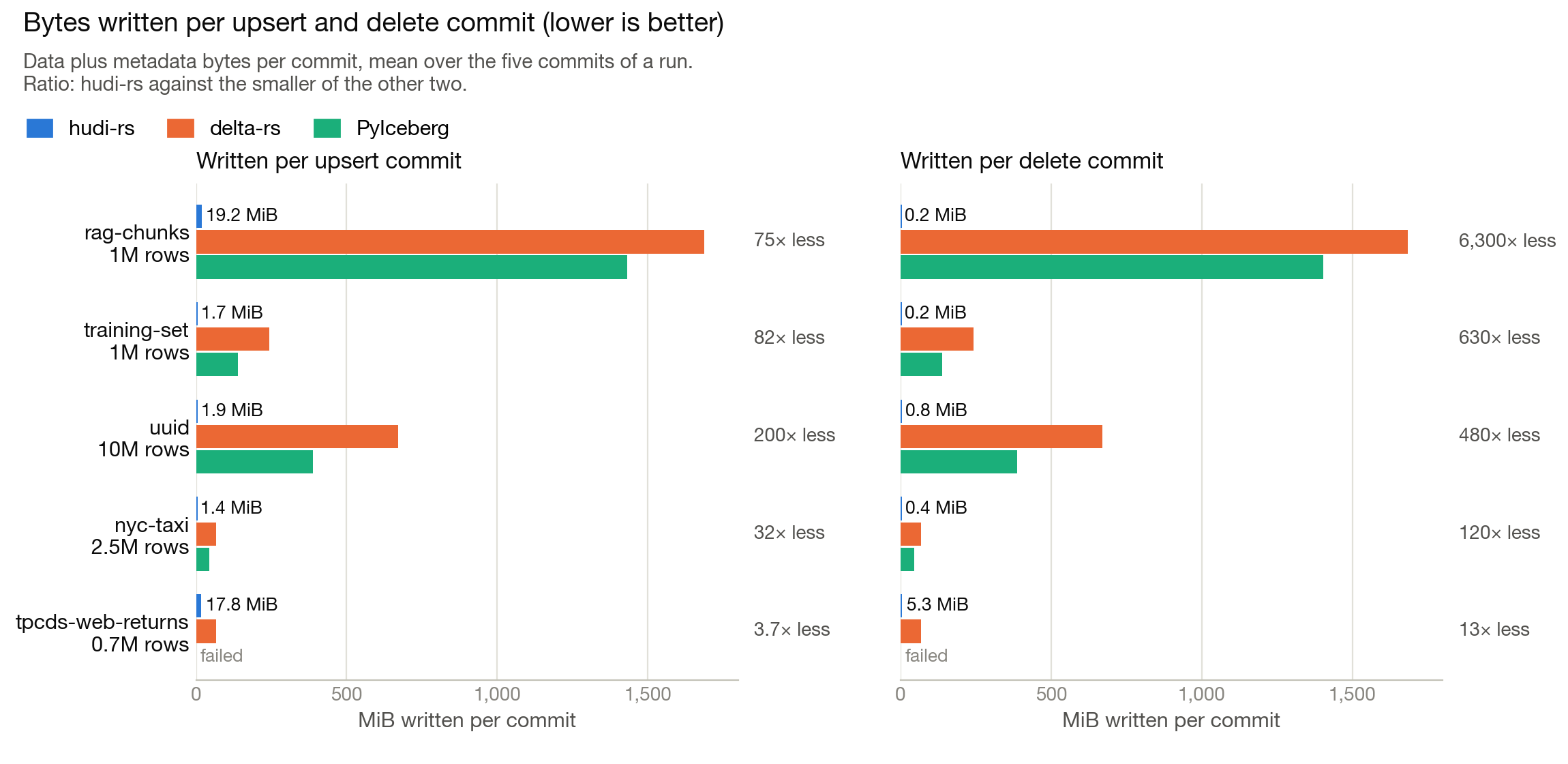
Why hudi-rs is faster on upserts and deletes. Low write amplification and the record-level index: a Merge-on-Read
commit appends only the changed records to log files, and the record-level index points each key at its file group, so
nothing else in the table is read or rewritten. Neither delta-rs nor PyIceberg writes deletion vectors in their latest
releases (delta-rs 1.6.6,
PyIceberg 0.12.0), and neither keeps a
record-level index, so every update or delete rewrites each data file it touches. The changed keys here are spread
across the table, so each Copy-on-Write commit rewrites nearly all of it: per upsert commit, hudi-rs wrote 19 MiB on
rag-chunks where delta-rs rewrote 1,689 MiB and PyIceberg 1,432 MiB, and 2 MiB on uuid against 671 MiB and 388 MiB.
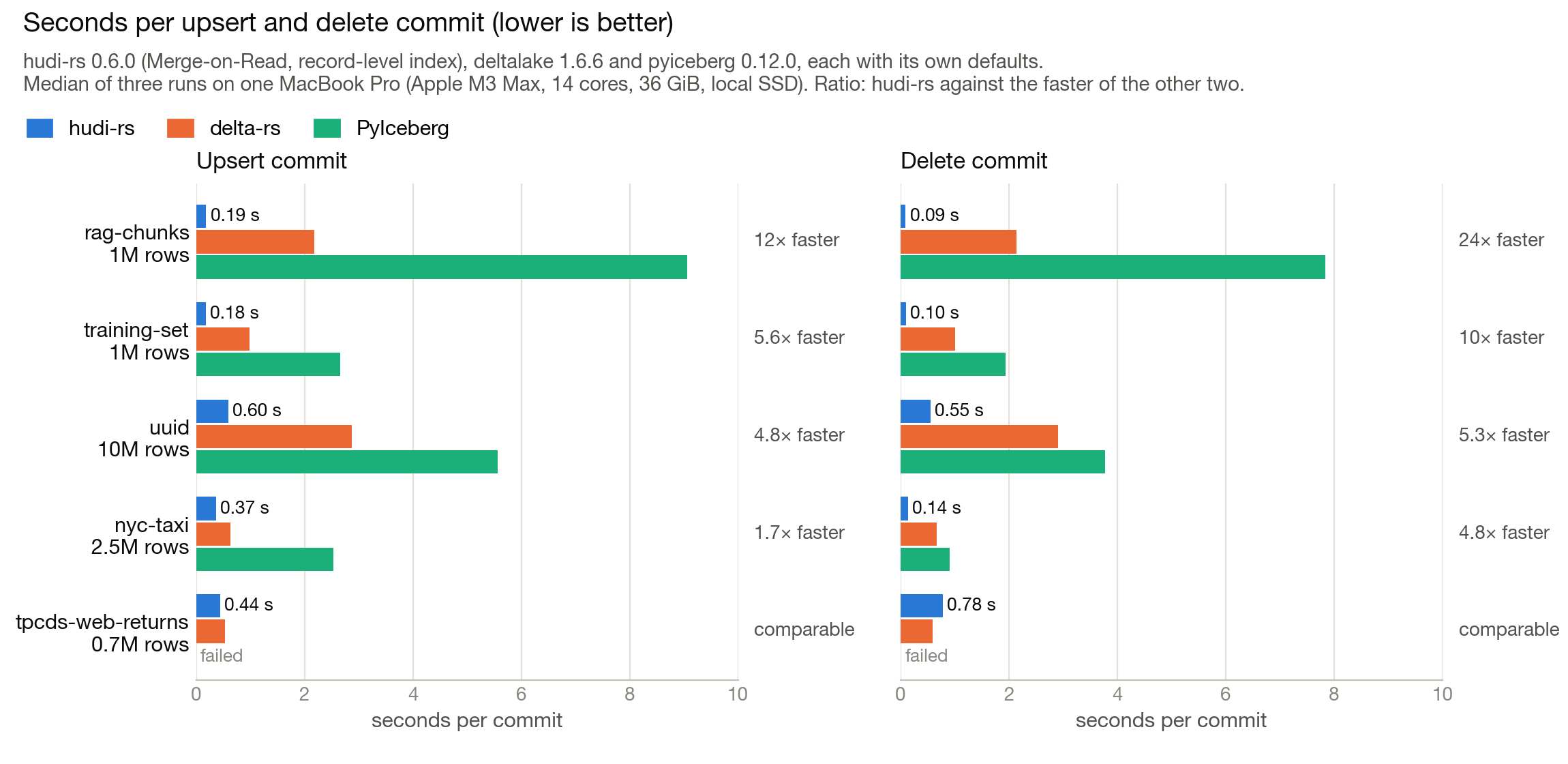
The trade-off shows up in the bulk load. Loading the 10M-row uuid table takes 5.7 s in Hudi against 2.8 s for
delta-rs and 1.3 s for PyIceberg, because about 2.4 s of it builds the metadata table and its record-level index up
front, an investment that pays off in the latency of every later upsert and delete. The initial load is likewise
slower on nyc-taxi and tpcds-web-returns, and on par or faster on the two 1M-row workloads, rag-chunks and
training-set.
Reproduce it. This guide pins the hudi-rs commit, every package version and the delta-rs and PyIceberg cases, and gives the exact commands.
Read a table
- Python
- Rust
from hudi import HudiReadOptions, HudiTableBuilder
import pyarrow as pa

table = HudiTableBuilder.from_base_uri("/tmp/trips").build()

# Snapshot, with partition and row filters pushed down
batches = table.read(HudiReadOptions(filters=[("city", "=", "sf")]))
print(pa.Table.from_batches(batches))

# Time travel
batches = table.read(HudiReadOptions().with_as_of_timestamp("20261029120000000"))

# Incremental: rows from commits that completed after a point in time, such as
# the completion_time of an earlier write
from hudi import HudiQueryType
since = "20261029120000000"
batches = table.read(HudiReadOptions().with_query_type(HudiQueryType.Incremental).with_start_timestamp(since))

# Stream batches instead of materializing the result
for batch in table.read_stream(HudiReadOptions(projection=["id", "fare"]).with_batch_size(4096)):
    print(batch.num_rows)
use hudi::table::builder::TableBuilder as HudiTableBuilder;
use hudi::table::{QueryType, ReadOptions};

let table = HudiTableBuilder::from_base_uri("/tmp/trips").build().await?;

// Snapshot, with partition and row filters pushed down
let batches = table.read(&ReadOptions::new().with_filters([("city", "=", "sf")])?).await?;

// Time travel
let batches = table.read(&ReadOptions::new().with_as_of_timestamp("20261029120000000")).await?;

// Incremental: rows from commits that completed after a point in time, such as
// the completion_time of an earlier write
let since = "20261029120000000";
let options = ReadOptions::new().with_query_type(QueryType::Incremental).with_start_timestamp(since);
let batches = table.read(&options).await?;
Timestamps accept the Hudi timeline format (yyyyMMddHHmmssSSS), Unix epoch in seconds through nanoseconds, and
RFC 3339 with a timezone offset.
To run a read-optimized query on a Merge-on-Read table (base files only, no log merge), set
hoodie.read.use.read_optimized.mode to true in the read options.
Query with DuckDB, Polars, and DataFusion
hudi-rs returns Arrow, so anything that consumes Arrow can query a Hudi table in Python.
import duckdb, polars as pl, pyarrow as pa
from hudi import HudiTableBuilder

trips = pa.Table.from_batches(HudiTableBuilder.from_base_uri("/tmp/trips").build().read())

duckdb.sql("SELECT city, avg(fare) FROM trips GROUP BY city").show()
print(pl.from_arrow(trips).group_by("city").agg(pl.col("fare").mean()))
In Rust, the datafusion feature of the hudi crate registers a Hudi table as a DataFusion table provider.
Add the hudi crate with the datafusion feature to your application.
cargo new my_project --bin && cd my_project
cargo add tokio@1 datafusion@55  # the DataFusion major hudi 0.6 builds against
cargo add hudi --features datafusion
use std::sync::Arc;

use datafusion::error::Result;
use datafusion::prelude::{DataFrame, SessionContext};
use hudi::HudiDataSource;

#[tokio::main]
async fn main() -> Result<()> {
    let ctx = SessionContext::new();
    let hudi = HudiDataSource::new_with_options("/tmp/trips", [("hoodie.read.input.partitions", "5")]).await?;
    ctx.register_table("trips", Arc::new(hudi))?;
    let df: DataFrame = ctx.sql("SELECT * FROM trips WHERE city = 'sf'").await?;
    df.show().await?;
    Ok(())
}
The same provider is available in Python through HudiDataFusionDataSource when the datafusion extra of the
hudi package is installed. Hudi tables can also be read by Daft and
Ray.
Work with cloud storage
Set the usual cloud credentials as environment variables (AWS_*, AZURE_*, GOOGLE_*) and use an s3://,
az://, or gs:// base URI. Storage options can also be passed explicitly.
- Python
- Rust
from hudi import HudiTable, HudiTableBuilder

table = HudiTable.create("s3://bucket/trips", record_key="id", storage_options={"aws_region": "us-west-2"})

reader = HudiTableBuilder.from_base_uri("s3://bucket/trips").with_option("aws_region", "us-west-2").build()
use hudi::table::Table;
use hudi::table::builder::TableBuilder as HudiTableBuilder;

let mut table = Table::create("s3://bucket/trips")
    .with_table_name("trips")
    .with_record_key_fields(["id"])
    .with_storage_option("aws_region", "us-west-2")
    .create()
    .await?;

let reader = HudiTableBuilder::from_base_uri("s3://bucket/trips")
    .with_option("aws_region", "us-west-2")
    .build()
    .await?;
Query engine integration
For engines that plan their own scans, hudi-rs exposes the planning and execution primitives directly.
| Stage | API | Description |
|---|---|---|
| Query planning | get_file_slices(options) | The file slices a read targets, dispatched on the query type (snapshot, time travel, incremental). |
compute_table_stats(options) | Estimated row count and byte size for scan planning, from the metadata table (snapshot only). | |
| Query execution | create_file_group_reader_with_options() | A file group reader with the table's configs; pass the same read options used for get_file_slices. |
read_file_slice() / read_file_slice_stream() | Read one file slice, merging base and log files per the table's merge strategy. |
Resources
- Rust API reference: docs.rs/hudi, the
hudicrate, which re-exportshudi-coreand, with thedatafusionfeature,hudi-datafusion. - Python API reference: the docstrings in the type stubs shipped with the package,
hudi/_internal.pyi, which IDEs and type checkers read. - The hudi-rs README: a shorter quick start and the full read and write reference.
- Runnable Rust example:
crates/core/examples/table_writes.rs. - Reader semantics:
docs/reader-spec.md. Writer design:docs/writer-design.md. - Packages: PyPI and crates.io. Source: github.com/apache/hudi-rs.
- Hudi concepts (timeline, table types, query types): overview.
Contributing
Check out the contributing guide for all the details about making contributions to the project.