Storage Layouts
The following describes the general organization of files in storage for a Hudi table.
- Hudi organizes data tables into a directory structure under a base path on a storage.
- Tables are optionally broken up into partitions, based on partition columns defined in the table schema.
- Within each partition, files are organized into file groups, uniquely identified by a file ID (uuid)
- Each file group contains several file slices.
- Each slice contains a base file (parquet/orc/hfile) (defined by the config - hoodie.table.base.file.format ) written by a commit that completed at a certain instant, along with set of log files (.log.) written by commits that completed before the next base file's requested instant.
- Hudi employs Multiversion Concurrency Control (MVCC), where compaction action merges logs and base files to produce new file slices and cleaning action gets rid of unused/older file slices to reclaim space on the file system.
- All metadata including timeline, metadata table are stored in a special
.hoodiedirectory under the base path.
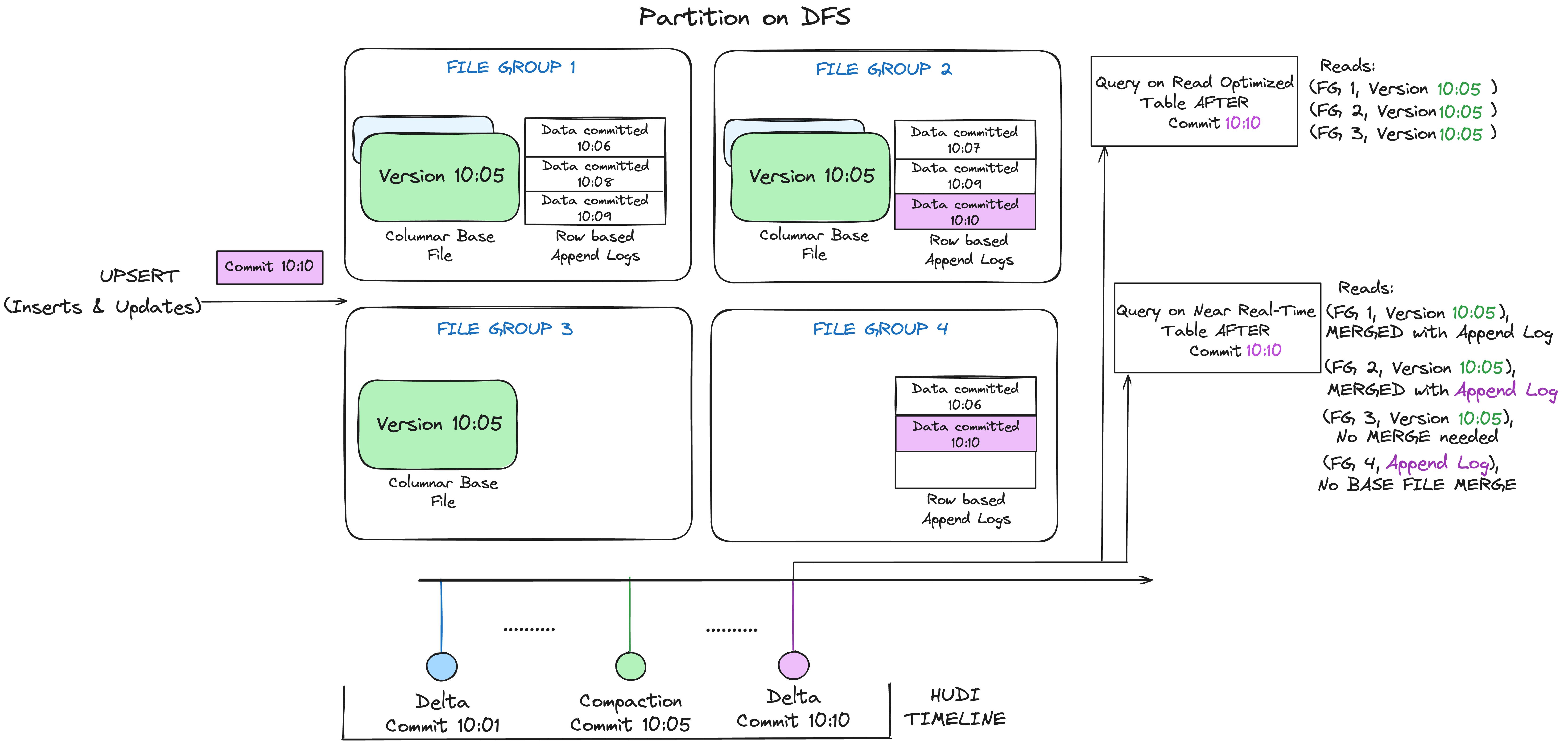
Please refer the tech spec for a more detailed description of the file layouts.
Base Files
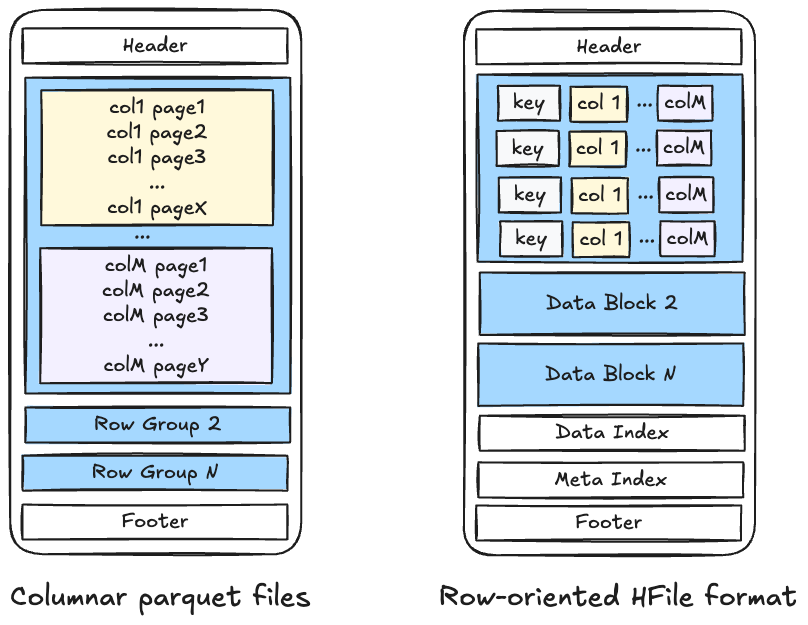
Base files store full records, against which change records are stored in delta log files below. Hudi currently supports following base file formats.
- columnar formats for vectorized reads, columnar compression and efficient column based access for analytics/data science.
- row-oriented avro files for fast scans for reading whole records.
- random access optimized HFiles for efficient searching for indexed records (based on SSTable format)
- Lance files for native
VECTORstorage and AI/ML workloads (Spark-only).
Lance base file format
Lance is a pluggable base file format selected per table via
hoodie.table.base.file.format = 'lance'. Hudi manages the table layer
(timeline, metadata, schema, file groups, table services); Lance is the on-disk file format for
base files. Log files for MOR tables remain Avro; log compaction merges Avro logs into Lance base
files.
-- COW
CREATE TABLE my_ai_table (
    id        STRING,
    embedding VECTOR(768),
    metadata  STRING
) USING hudi
TBLPROPERTIES (
    primaryKey = 'id',
    type = 'cow',
    hoodie.record.merger.impls = 'org.apache.hudi.DefaultSparkRecordMerger',
    hoodie.table.base.file.format = 'lance'
);

-- MOR (Lance base + Avro logs)
CREATE TABLE my_ai_table_mor (
    id        STRING,
    embedding VECTOR(768),
    metadata  STRING
) USING hudi
TBLPROPERTIES (
    primaryKey = 'id',
    type = 'mor',
    hoodie.record.merger.impls = 'org.apache.hudi.DefaultSparkRecordMerger',
    hoodie.table.base.file.format = 'lance'
);
Hudi table services on Lance-backed tables behave as follows. Compaction merges Avro log files into Lance base files. Clustering reorganizes records into new Lance files. Cleaning removes obsolete Lance file slices. Bloom filter indexing is supported; column-stats and partition-stats indices are automatically disabled for Lance base files. See Indexes for the supported set.
Type-specific behavior on Lance:
VECTORcolumns are stored natively as LanceFixedSizeList<Float32/Float64, dim>(FLOAT or DOUBLE only;INT8is not supported on Lance and fails fast at write).BLOBcolumns default toDESCRIPTORread mode, same as Parquet.VARIANTcolumns are not supported on Lance. Writing a table with a VARIANT column to Lance throwsHoodieNotSupportedException. Use Parquet for VARIANT tables.- Complex types (
STRUCT,ARRAY,MAP) are supported as Lance columns. populateMetaFields=falseis supported. User-defined key generators work normally with Lance-backed tables.
Lance is Spark-only. Reading a Lance-backed table from Flink, Hive, Presto, or Trino throws
HoodieValidationException. Lance files are also non-splittable: a single Spark task reads one
Lance base file.
The Lance JAR is not bundled in the Hudi distribution. Add the Lance Spark bundle that matches your Spark version to the Spark classpath:
| Spark version | Bundle (Maven Central) |
|---|---|
| Spark 3.4 | org.lance:lance-spark-bundle-3.4_2.12:0.4.0 |
| Spark 3.5 | org.lance:lance-spark-bundle-3.5_2.12:0.4.0 |
| Spark 4.0 | org.lance:lance-spark-bundle-4.0_2.13:0.4.0 |
| Spark 4.1 | org.lance:lance-spark-bundle-4.1_2.13:0.4.0 |
export LANCE_BUNDLE_JAR=/path/to/lance-spark-bundle-3.5_2.12-0.4.0.jar
spark-shell --jars $HUDI_BUNDLE_JAR,$LANCE_BUNDLE_JAR
File sizing and memory
| Property | Default | Description |
|---|---|---|
hoodie.lance.max.file.size | 125829120 (120 MiB) | Target file size in bytes for Lance base files (analogous to hoodie.parquet.max.file.size). |
hoodie.lance.write.allocator.size.bytes | 268435456 (256 MiB) | Maximum size of the Arrow child allocator used for buffering in-flight batch data. Increase for tables with very large BLOB columns. |
hoodie.lance.write.flush.byte.watermark | 100663296 (96 MiB) | Byte-size threshold at which the current write batch is flushed. Must be less than hoodie.lance.write.allocator.size.bytes. |
Arrow uses power-of-2 buffer doubling; the default 256 MiB allocator accommodates a 128 MiB doubling
step with headroom. The default 96 MiB watermark (~3/8 of the allocator cap) leaves room for offset
and validity buffers to double without exceeding the allocator limit. For tables with large BLOB
columns, increase the allocator and watermark together (keep watermark ≈ 3/8 of allocator).
Mixed-format tables
hoodie.table.base.file.format is set per table, so different tables in the same lakehouse can use
different base file formats (Parquet, ORC, HFile, Lance) under a shared Hudi catalog and metadata
table.
Log Files
Log files store incremental changes (partial or full) to a base file, such as updates, inserts, and deletes, after the base file was created. Log files contain different blocks (data, command, delete blocks etc.) that encode specific changes to the base file. The data block encodes updates/inserts to the base file, with customizability to support different needs.
- row-oriented avro files for fast/lightweight writing
- random access optimized HFiles for efficient searching for indexed records (based on SSTable format)
- columnar parquet files for vectorized log merging.
Storage Format Versioning
Elements of Hudi's storage format like log format, log block structure, timeline file/data schema are all versioned and tied to a given table version. The table version is a monotonically increasing number that is bumped up everytime some bits produced in storage change.
Backwards compatible reading: Hudi releases are backwards compatible to ensure new software releases can read recent older table versions. The recommended way to upgrade Hudi across different engines, is by first upgrading all readers (e.g. interactive query engines that consume tables) and then upgrading any/all writers and table services. Hudi storage engine also implements auto upgrade capability that can gracefully perform a table version upgrade on the subsequent write operation, by automatically performing any necessary steps without downtime to queries/reads.
Backwards compatible writing: However, this may not be possible at all times given data platforms built on Hudi could have multi-stage pipelines that can act as readers and writers at the same time. In such cases, Hudi upgrade needs to be performed by upgrading the most downstream jobs first, tracking all the way to the first Hudi tables written possibly by ingestion systems. To ease this process, Hudi allows also writing recent older table versions, such that the new Hudi software binaries can first be rolled out across the entire deployment on top of the same older table version. Once all jobs and engines have the new binary, then upgrade to newer table version can happen in any order and readers will dynamically adapt.
Configs
The following writer configs control writing older table versions and auto upgrade behavior.
| Config Name | Default | Description |
|---|---|---|
| hoodie.write.table.version | latest (Optional) | The table version this writer is storing the table in. This should match the current table version, if table already exists. Set this to a lower version when upgrade as described above. |
| hoodie.write.auto.upgrade | true (Optional) | If enabled, writers automatically migrate the table to the specified write table version if the current table version is lower. |
Please refer here for additional configs that control storage layout and data distribution, which defines how the files are organized within a table.